
Legacy Application Inventory: How to Identify and Assess Your Systems
You can’t modernize what you can’t see.
Most organizations don’t have a complete, current view of their application portfolio. Systems accumulate through growth, acquisitions, and tactical decisions. Ownership becomes unclear, usage declines, duplicate capabilities emerge, and maintenance costs continue long after the original business need has changed.
Before making modernization decisions, organizations need a clear understanding of what they own, who depends on it, and where business value actually exists.
An application inventory is the first step in any effective legacy system assessment.
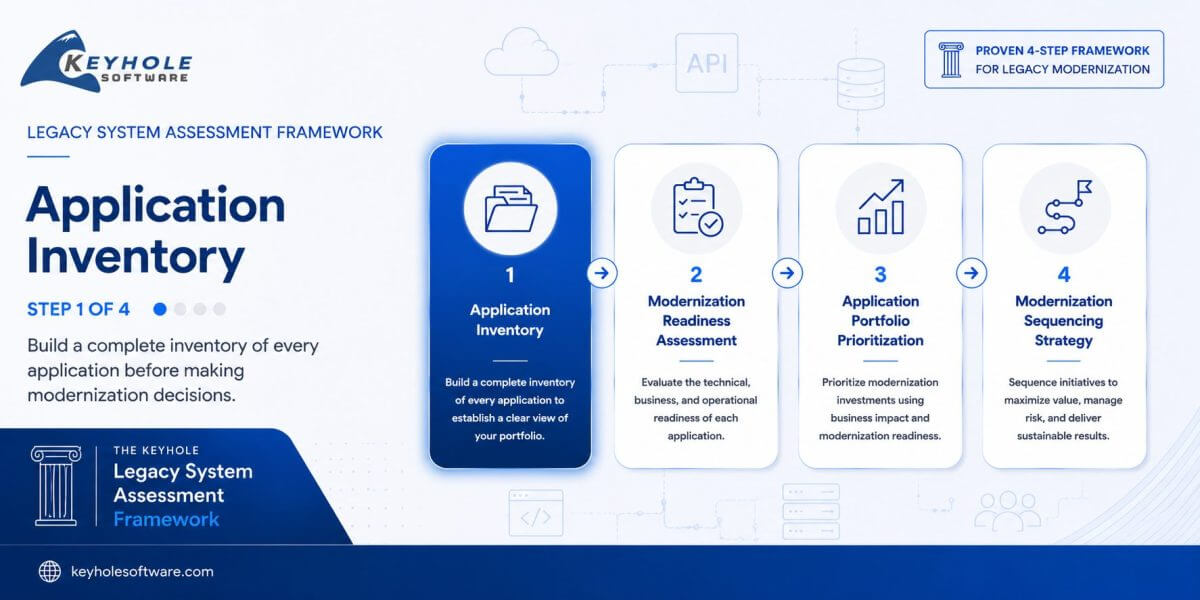
This article is Step 1 of a complete legacy system assessment framework, covering application inventory, readiness assessment, prioritization, and modernization sequencing. Each step builds toward a practical modernization roadmap.
By the end of this guide, you’ll know how to:
- Build a complete application inventory
- Identify ownership gaps and redundant systems
- Capture the information needed for modernization planning
- Prepare your portfolio for modernization readiness assessment
What Is an Application Inventory?
An application inventory is a structured list of all systems in your environment, along with key details about ownership, usage, cost, and business purpose.
Application inventory is sometimes referred to as legacy system inventory or application portfolio inventory, depending on the organization.
The goal is not perfection, it’s visibility. Start with a simple working session. A whiteboard or spreadsheet is enough to begin identifying what exists and how it is used.
Why Application Inventory Matters
Application inventory creates the visibility needed to make informed modernization decisions. Without it, organizations risk investing in low-value systems, overlooking hidden dependencies, and underestimating technical debt.
A structured inventory provides the foundation for application portfolio management, modernization planning, and portfolio rationalization by answering three questions:
- What do we have?
- Who depends on it?
- What should happen next?
What to Capture for Each System
For each system, capture:
- Function – What does the system support? (external application, internal tool, batch process, integration)
- Ownership – Who is responsible for maintaining it today? (“No clear owner” is a meaningful and common finding)
- Usage – How many users rely on it, and how frequently?
- Age – When was it introduced or last significantly updated?
- Estimated cost – What does it take to maintain (infrastructure, licensing, support)?
- Business criticality – How important is this application to daily operations, revenue generation, customer experience, or regulatory compliance?
This baseline is enough to begin identifying patterns and prioritization opportunities.
How to Run an Application Inventory Workshop
In practice, this step works best as a structured working session.
If you’d like to complete this process as you read, download the free Legacy System Assessment Toolkit. It includes the same application inventory worksheet, assessment templates, scoring model, and planning tools our architects use during modernization engagements.
→ Download the Free Legacy System Assessment Toolkit
Who Should Participate?
A successful inventory workshop typically includes:
- Enterprise or solution architects
- Senior developers familiar with legacy systems
- Operations or infrastructure leads
- Application owners
- Product or business stakeholders when available
The goal is to combine technical knowledge with business context. The most productive workshops focus on discovery rather than debate. Unknowns should be documented and investigated later rather than delaying progress.
Format (60–90 minutes):
- List all known systems
- Capture basic attributes for each
- Flag unknowns or gaps
- Identify obvious redundancies
The goal is not completeness. It is shared understanding. If your team cannot confidently describe a system, that is a signal it needs further evaluation.
Don’t spend time debating unknowns during the workshop. Record them, assign follow-up, and keep the session moving.
Expected Output
By the end of the workshop, your team should have:
- A preliminary application inventory covering every known business application
- Documented ownership gaps and applications requiring further investigation
- Candidate systems for retirement, replacement, or consolidation
- A prioritized list of unknowns, dependencies, and follow-up activities
Perfection is not the objective. The goal is to establish enough visibility to support modernization readiness assessment in the next phase of the framework.
Tools for Application Inventory
You do not need complex tooling to get started. Most teams begin with:
- Spreadsheets (Google Sheets, Excel)
- Whiteboards or collaborative tools (Miro, Mural)
- Existing CMDB or documentation systems (if available)
More advanced environments may integrate:
- cloud inventory tools
- asset management platforms
- automated discovery tools
But simplicity is often more effective in early stages.
What You Will Uncover and What to Do Next
As you complete your application inventory, patterns become clear quickly.
In most organizations, this step reveals:
- Systems that are no longer actively used
- Redundant tools solving the same problem across different teams or in different parts of the business
- Applications with no clear ownership or support responsibility
- Legacy components that persist simply because they have not been evaluated
- Systems with high maintenance cost but limited business value
These findings are not just observations. They point directly to action.
One pattern appears consistently across organizations: teams are often surprised by how many business-critical processes rely on systems that have little documentation, unclear ownership, or no active development roadmap.
Another common discovery is that some of the most business-critical systems are also the least documented. Teams often assume these applications are well understood until inventory efforts reveal hidden dependencies, unsupported integrations, or concentrated tribal knowledge.
Immediate Actions
Start with the highest-confidence opportunities:
- Flag systems with zero active users for retirement
- Identify applications with no clear ownership
- Highlight systems with high cost and low business value
- Document potential cost savings early to build momentum
Early takeaway: Anything with low usage, unclear ownership, or limited business value should be flagged for further review. Many organizations find that a meaningful portion of their portfolio can be retired or consolidated with minimal disruption.
In practice, this step alone often identifies a meaningful portion of the portfolio that can be retired, replaced, or consolidated with minimal disruption. That creates immediate impact by:
- simplifying the application landscape
- reducing ongoing maintenance costs
- freeing up budget for modernization initiatives
Quick Inventory Checklist
Before moving to the next step, make sure every application in your inventory includes:
- Business purpose
- Owner
- Active user count
- Estimated annual cost
- Technology stack (if known)
- Known integrations or dependencies
You do not need perfect information. You need enough information to evaluate readiness and prioritize modernization efforts.
Example Inventory Snapshot
The example below illustrates a completed application inventory. The downloadable toolkit includes an editable version of this worksheet, along with additional fields for technology stack, integrations, business criticality, modernization readiness, and portfolio prioritization.
| Application | Business Purpose | Owner | Estimated Annual Cost | Modernization Notes |
|---|---|---|---|---|
| Customer Portal | Customer Self-Service | Digital Products | $250,000 | Revenue-generating application with multiple API integrations and high business visibility. |
| ERP Platform | Finance & Operations | Enterprise Applications | $450,000 | Mission-critical ERP supporting core business processes across the organization. |
| Payroll COBOL | Payroll Processing | HR Systems | $120,000 | Business-critical legacy application with limited documentation and specialized knowledge. |
| CRM Custom Reports | Internal Reporting | Sales Operations | $85,000 | Reporting capabilities largely duplicated within the enterprise CRM platform. |
| Inventory Scanner | Warehouse Operations | Warehouse Operations | $95,000 | Aging handheld hardware and unsupported mobile runtime create operational risk. |
| Legacy Reporting DB | Business Intelligence | Business Intelligence | $42,000 | Historical reporting database with overlapping reporting capabilities. |
| File Share Workflow | Document Routing | Operations | $32,000 | Legacy shared drive used for approvals and document routing that could be consolidated. |
| Marketing Website | Marketing & Lead Generation | Marketing | $55,000 | Public-facing website supporting lead generation and digital marketing campaigns. |
| Identity Services | Authentication & Access | Infrastructure | $110,000 | Enterprise identity platform supporting authentication across business applications. |
| Integration Services | Enterprise Integrations | Enterprise Architecture | $185,000 | Integration platform connecting ERP, CRM, HR, customer-facing, and internal systems. |
Notice that this inventory intentionally captures both business and technical context. At this stage, the goal is not to document every detail—it is to collect enough information to evaluate modernization readiness in Step 2 and prioritize the portfolio in Step 3.
Don’t worry if your first inventory is incomplete. Most organizations refine their inventory over multiple workshops as new applications, dependencies, and ownership details are uncovered. The objective is to establish a reliable starting point—not perfect documentation.
How AI Can Accelerate Application Inventory
AI can significantly speed up the inventory process, especially in environments with limited documentation. Used within a governed approach, AI can help:
- Analyze codebases to identify undocumented systems and dependencies
- Summarize application purpose from source code
- Identify unused or redundant components
- Map relationships between systems, databases, and integrations
- Surface hidden batch jobs, scripts, and background processes
This is particularly valuable when systems have been maintained over long periods or by multiple teams.
However, AI should support the process, not replace it. Architect validation is still required to:
- confirm business context
- validate dependencies
- assess risk
The combination of AI-assisted discovery and architect-led validation allows teams to move faster while maintaining accuracy.
Common Application Inventory Mistakes
Organizations often struggle with application inventory efforts because they:
- Attempt to create a perfect application portfolio inventory before taking action
- Focus on technical systems while overlooking business-owned applications
- Rely solely on automated discovery tools without stakeholder validation
- Ignore ownership gaps and undocumented dependencies
- Treat inventory as a one-time exercise rather than an ongoing capability
The goal is not perfect documentation. The goal is enough visibility to make informed modernization decisions.
Why Application Inventory Matters In Legacy System Assessment
This step alone often identifies a meaningful portion of the portfolio that can be retired, replaced, or consolidated with minimal disruption. The result is immediate impact:
- Simplified application landscape
- Reduced maintenance costs
- Increased capacity for modernization work
It also creates the foundation for everything that follows. By the end of Step 1, every application should have enough information to support a modernization readiness assessment—not perfect documentation, but sufficient context for informed decision-making.
Ready for the Next Step?
Once you have visibility into your application portfolio, the next step in the Legacy System Assessment Framework is to determine how prepared each application is for modernization.
In Step 2, you’ll evaluate every application across five readiness pillars:
- Infrastructure
- Application Code
- Data
- DevOps & Delivery
- Team Capability
The result is a consistent modernization readiness score that becomes the foundation for portfolio prioritization and modernization planning.
→ Continue to Step 2: Modernization Readiness Assessment
Need Help?
Large application portfolios often uncover hidden dependencies, duplicate systems, ownership gaps, and undocumented business processes that make modernization more complex than expected.
Keyhole Software helps organizations:
- Facilitate application inventory workshops
- Validate application ownership and dependencies
- Identify retirement, replacement, and consolidation opportunities
- Build modernization roadmaps aligned with business priorities
- Accelerate discovery through architect-led, AI-assisted analysis
If your organization needs an outside perspective, we’re happy to help.
→ Schedule a Legacy System Assessment Workshop
Prefer to Start on Your Own?
Download the free Keyhole Legacy System Assessment Toolkit and work through the same application inventory templates, assessment worksheets, scoring model, and planning tools our architects use during modernization engagements.
→ Download the free Keyhole Legacy System Assessment Toolkit
More From Keyhole Software
About Keyhole Software
Expert team of software developer consultants solving complex software challenges for U.S. clients.
Share This Post
Join The Thousands Of Devs Who Subscribe
Discuss This Article
Subscribe
Login
0 Comments
Oldest