
Custom Software Development Process: Enterprise Best Practices 2026
Custom Software Development Process: Enterprise Best Practices
Enterprise software development requires disciplined execution balanced with flexibility to adapt to changing requirements. Organizations implementing custom software projects are expected to deliver high-quality systems on predictable timelines while navigating legacy integrations, regulatory requirements, and evolving stakeholder needs.
Industry research consistently shows that breakdowns in process—not tooling—are the leading cause of enterprise software delays. Research from Gartner indicates that 45% of enterprise software projects exceed original timelines due to inadequate process discipline¹.
For technology leaders, understanding the full custom software development process—from discovery through long-term evolution—is critical to setting realistic expectations, reducing delivery risk, and ensuring systems remain reliable long after launch.
What this guide covers:
- The seven core phases of custom software development, including practical deliverables and realistic timeframes
- How quality assurance practices are integrated throughout the development lifecycle
- Timeline expectations for enterprise projects based on complexity and risk profile
- How Agile practices are applied in real enterprise environments to balance governance, adaptability, and long-term system health
While this guide outlines a structured enterprise development lifecycle, it’s important to note that no single process fits every organization. The depth, formality, and sequencing of these phases can vary significantly based on company size, regulatory environment, and whether teams operate in a project-based or product-led model.
At Keyhole, we treat this lifecycle as a flexible framework — scaling governance up for regulated, enterprise environments and streamlining it for product-focused teams where architecture and requirements emerge iteratively.
Understanding the Enterprise Development Lifecycle
Successful custom software development follows a structured process that transforms business requirements into functional systems. In practice, the methodology combines disciplined planning with iterative execution, enabling teams to deliver value incrementally while preserving architectural integrity and long-term maintainability.
Enterprise teams typically move through seven overlapping phases. These phases are not rigid handoffs or approval gates. Requirements continue to evolve, quality assurance runs continuously, and architectural decisions are revisited as complexity emerges. Rather than prescribing a fixed sequence, the lifecycle represents risk controls that scale up or down based on system criticality, integration depth, and business impact.
While this lifecycle reflects how many enterprise organizations plan and govern software delivery, effective teams adapt the depth and formality of each phase to match their operating model and risk profile.
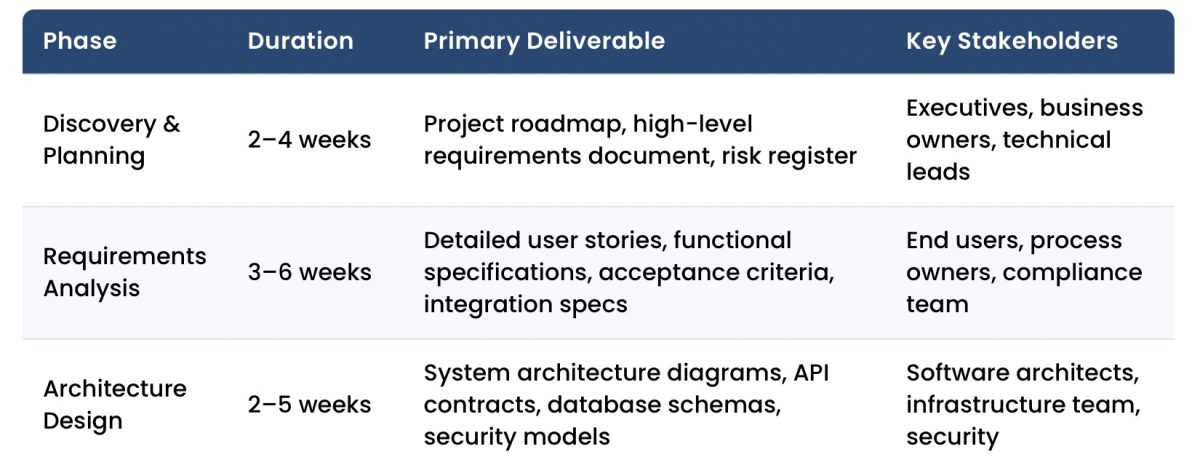
| Phase | Duration | Primary Deliverable | Key Stakeholders |
|---|---|---|---|
| Discovery & Planning | 2–4 weeks | Project roadmap, high-level requirements document, risk register | Executives, business owners, technical leads |
| Requirements Analysis | 3–6 weeks | Detailed user stories, functional specifications, acceptance criteria, integration specs | End users, process owners, compliance team |
| Architecture Design | 2–5 weeks | System architecture diagrams, API contracts, database schemas, security models | Software architects, infrastructure team, security |
| Development Execution | 8–24+ weeks | Working software delivered in 2-week increments (sprints) | Development team, product owner, QA engineers |
| Quality Assurance | Continuous | Automated tests, defect tracking, performance benchmarks | QA team, developers, business analysts |
| Deployment | 1–3 weeks | Production system, operational runbooks, user training materials | Operations team, infrastructure, support staff |
| Maintenance & Evolution | Ongoing | Feature enhancements, security patches, performance optimizations | Support team, development team, users |
These phases intentionally overlap rather than occur in strict sequence. Quality assurance begins during development, not after. Requirements refinement continues through implementation. Architecture evolves as real usage and integration demands emerge. Deployment planning often starts early, particularly for regulated or business-critical systems.
This lifecycle is not waterfall in disguise. In practice, phases compress, repeat, or expand based on project context. Product-led teams may move quickly from discovery into delivery with architecture emerging incrementally, while highly regulated or deeply integrated enterprise systems benefit from greater upfront clarity. The value of the lifecycle is not rigidity, but shared structure that supports informed decision-making as complexity increases.
Process Fit by Organization Type
The same development lifecycle looks different depending on organizational context.
Project-Based, Enterprise Organizations
These teams typically operate with formal approvals, fixed budgets, and strong architectural governance. Discovery and planning are more comprehensive, estimates are validated across stakeholders, and deployment is carefully staged. This model aligns well with regulated industries and large enterprises.
Product-Led or Smaller Teams
In product-oriented environments with empowered decision-makers, discovery is often shorter, user stories emerge continuously, and architecture evolves incrementally. Delivery cycles are faster, deployments happen earlier, and governance is lighter — while still maintaining quality and security standards.
Effective custom software development adapts process depth to organizational reality rather than forcing a single methodology across all teams.
Phase 1: Discovery and Planning
Discovery establishes project foundation through detailed business analysis and technical assessment. This phase identifies core requirements, evaluates technical feasibility, and creates comprehensive project plans that guide subsequent work.
| Discovery Activity | Specific Deliverables | Timeline | Typical Findings |
|---|---|---|---|
| Stakeholder Interviews | Business objective documentation, success metrics definition, constraint identification | 1–2 weeks | Competing priorities requiring trade-off decisions, hidden integration dependencies with legacy systems (AS/400, COBOL), regulatory requirements (HIPAA, SOX, GDPR) |
| Technical Assessment | Current architecture documentation, integration complexity analysis, technology stack evaluation | 1–2 weeks | Legacy data formats (EDI, HL7, flat files), hardware integration needs (PLCs, scanners, medical devices), API limitations in existing systems |
| Risk Analysis | Risk register with probability/impact scores, mitigation strategies, contingency plans | 3–5 days | Data migration complexity from legacy databases, third-party API version deprecations, skill gaps requiring specialized consultants |
| Budget Planning | Development cost estimates, infrastructure budgets, training allocations, 5-year TCO projections | 1 week | 15–20% annual maintenance costs, cloud infrastructure scaling costs, licensing fees for development tools and production monitoring |
At Keyhole, discovery focuses equally on business clarity and technical feasibility. Rather than treating discovery as a documentation exercise, we use it to surface risk early and establish shared understanding before complexity compounds.
Discovery combines stakeholder interviews with technical assessment to establish the software project foundation. Business leaders articulate objectives and success criteria while technical teams evaluate existing infrastructure, integration complexity, and architectural constraints.
This analysis produces comprehensive actionable outputs, including scope boundaries, risk catalogs with mitigation strategies, governance structures defining decision authority, and budget projections that account for initial development and the ongoing reality of 15-20% annual maintenance costs².
Technical feasibility assessment plays a central role. We evaluate technology options, integration patterns, and architectural approaches early, so downstream design and development decisions are grounded in what will scale and remain maintainable. In our experience, rushing this work increases long-term cost—ambiguous requirements and overlooked constraints surface later as rework, schedule delays, or architectural compromises.
Discovery typically spans two to four weeks in enterprise environments, where governance, integrations, and compliance demand greater upfront clarity. Product-led teams may compress this phase significantly, continuing discovery in parallel with early delivery. In either case, the goal is to align upfront rigor to the system’s risk profile.
Phase 2: Requirements Gathering and Analysis
Requirements translate business needs and intent into detailed specifications that guide design and development. This phase emphasizes precision as ambiguous requirements lead to costly rework and missed expectations.
Organizations employ multiple techniques to capture comprehensive requirements. User interviews document current workflows and pain points. Process observation reveals operational details users may not articulate. Facilitated workshops can align stakeholders on priorities when requirements conflict.
| Requirement Type | Documentation Method | Stakeholder Involvement | Common Examples |
|---|---|---|---|
| Functional Requirements | User stories with acceptance criteria, detailed specifications, workflow diagrams | End users validate workflows, business analysts document, developers estimate complexity | Insurance underwriting rules encoding proprietary risk models, healthcare intake forms with HIPAA-compliant PHI handling, logistics routing algorithms considering vehicle capacity and delivery windows |
| Non-Functional Requirements | Performance benchmarks, security standards, scalability targets, compliance checklists | Architects define technical standards, compliance team validates regulatory requirements | Sub-second response times for 500 concurrent users, data encryption at rest and in transit (AES-256), SOX audit trail requirements with immutable transaction logs |
| Integration Requirements | API specifications, data mapping documents, protocol definitions, authentication flows | IT operations identifies systems, architects design integration patterns | REST/JSON APIs for modern cloud services, HL7 v2.x messaging for EHR integration, EDI 837/835 for insurance claims processing, COBOL copybook parsing for AS/400 mainframe data |
| UI/UX Requirements | Wireframes, user journey maps, accessibility standards, responsive design specifications | End users participate in design validation, UX designers create mockups | WCAG 2.1 AA accessibility compliance, mobile-responsive design supporting iOS/Android tablets, role-based dashboards for executives vs. operational staff |
Requirements documentation combines user stories, functional specifications, and non-functional criteria into comprehensive development guidance.
- User stories frame needs from user perspective—”As a [user role], I want [capability] so that [business value]”—with acceptance criteria defining implementation success.
- Functional specifications detail system behavior including validation rules, calculation logic, and integration protocols.
- Non-functional requirements address performance benchmarks, security standards, and compliance obligations.
Organizations that involve end users early see higher adoption and fewer late-stage surprises. End users provide detailed workflow knowledge and validate proposed solutions, increasing adoption rates while surfacing requirements business analysts might miss. Compliance and security teams ensure regulatory obligations are addressed from the outset.
Through three to six weeks of collaborative refinement, teams prioritize requirements as “must-have,” “should-have,” and “nice-to-have” to guide scope decisions when timeline or budget pressures arise.
Rather than producing static documents, mature teams maintain a living backlog of prioritized requirements, categorized by business criticality.
Phase 3: System Architecture and Design
Architecture design establishes a technical foundation supporting current requirements and future growth. This phase produces detailed blueprints guiding development teams through implementation. This phase is where senior-level architectural judgment matters most.
Software architects evaluate technology options considering organizational standards, team expertise, integration requirements, and long-term maintainability. Technology selection weighs multiple factors including licensing costs, community support, security track record, and scalability characteristics.
| Architecture Component | Specific Contents | Owner | Key Decisions Documented |
|---|---|---|---|
| System Architecture | Component diagrams, data flow diagrams, deployment architecture, cloud infrastructure topology | Lead Software Architect | Microservices vs. monolithic architecture, event-driven patterns using Kafka/RabbitMQ, container orchestration with Kubernetes, multi-region deployment strategy for disaster recovery |
| Database Design | Entity-relationship diagrams, normalized table structures, indexing strategies, partitioning schemes | Database Architect | PostgreSQL vs. MongoDB selection based on data relationships, time-series data storage optimization, data retention policies (7-year compliance requirements), read-replica configuration for reporting queries |
| API Specifications | OpenAPI/Swagger documentation, authentication schemes, rate limiting policies, versioning strategy | API Architect | RESTful vs. GraphQL selection, JWT token-based authentication, OAuth 2.0 integration with existing identity providers (Okta, Azure AD), backward compatibility policies during version upgrades |
| Security Architecture | Authentication/authorization models, encryption standards, audit logging design, threat mitigation | Security Architect | Zero-trust network architecture, AES-256 encryption for data at rest, TLS 1.3 for data in transit, role-based access control (RBAC) with least-privilege principles, SIEM integration for security monitoring |
Architecture design produces comprehensive technical blueprints including system architecture documents that describe component structure and data flow, database designs specifying data models and retention policies, and API specifications defining integration contracts with authentication and error handling protocols. Clear API design enables parallel development of integrated components while reducing future integration complexity.
Architecture reviews should be collaborative and opinionated. Senior engineers challenge assumptions, validate tradeoffs, and often build proof-of-concepts to de-risk complex integrations or requirements before full development begins.
Architecture reviews engage senior developers, infrastructure engineers, and security specialists to identify potential issues before implementation begins when changes carry minimal cost. Proof-of-concept implementations validate unproven technical approaches, while comprehensive documentation provides reference material throughout development and supports knowledge transfer when team composition changes, reducing dependency on individual institutional knowledge.
This phase typically requires two to five weeks depending on system complexity. Enterprise systems with extensive integration requirements, compliance obligations, or novel technical approaches require longer design periods to adequately address technical risks.
In our experience, architecture shortcuts taken to save weeks during design often cost months once systems reach production scale.
Phase 4: Agile Development and Iterative Delivery
Development turns designs into working software through short, iterative delivery cycles that surface risk early and allow teams to adjust before small issues become systemic problems.
In enterprise environments, “agile” rarely means lightweight experimentation without guardrails. In practice, it means structured iteration, delivering in small, controlled increments while preserving predictability, quality controls, and alignment with broader organizational constraints.
Teams typically work in sprints—fixed delivery cycles, most often two weeks—designed to balance forward momentum with regular checkpoints. Sprint planning prioritizes the highest-risk and highest-value work first, not just what is easiest to deliver. Each sprint produces tested, deployable software that exposes integration issues, performance constraints, and requirement gaps while they are still inexpensive to address.
| Complexity Level | Development Duration | Example Applications | Typical Technical Characteristics |
|---|---|---|---|
| Simple Applications | 8–12 weeks (4–6 sprints) | Departmental tools, single-purpose workflows, internal dashboards | Single database, 3–5 REST API endpoints, basic CRUD operations, integration with 1–2 existing systems, authentication via SSO, minimal custom business logic |
| Moderate Complexity | 12–20 weeks (6–10 sprints) | Multi-system integration platforms, customer-facing portals, reporting systems | Multiple databases or microservices, 10–20 API endpoints, complex business rules engines, integration with 5–8 existing systems (ERP, CRM, payment gateways), real-time data synchronization |
| Complex Enterprise | 20–30+ weeks (10–15 sprints) | Core business platforms, financial systems, healthcare applications, logistics optimization | Distributed architecture with event-driven patterns, 30+ API endpoints, sophisticated algorithms (underwriting, routing, pricing), integration with 10+ legacy and modern systems, high transaction volumes (10k+ per hour), strict compliance requirements |
What distinguishes successful agile delivery is not the ceremony—it’s decision quality. Daily standups, sprint reviews, and backlog grooming only add value when senior engineers are actively evaluating tradeoffs, surfacing risks, and adjusting course based on real system behavior.
Code reviews function as architectural checkpoints, not just style reviews. Senior developers mentor through review, catch design drift early, and prevent technical debt from quietly accumulating sprint over sprint. In enterprise systems, early shortcuts almost always reappear later as stability, scalability, or compliance issues.
Agile does not eliminate planning; it enables controlled adaptation. Teams still plan releases, capacity, and integration sequencing, but they expect their original assumptions to be challenged once software meets real data, real users, and real operating conditions.
Version control and continuous integration are foundational. All changes are tracked, tested, and validated continuously, allowing teams to work in parallel without destabilizing the codebase. Automated builds and tests surface integration issues immediately rather than deferring them to late-stage testing or production incidents.
At Keyhole, agile delivery works because it is led by senior-level, U.S.-based engineers who understand when to adapt and when to hold the line. Our consultants embed directly into client teams to design and build custom applications or modernize legacy systems—bringing practical judgment, strong engineering discipline, and the experience to adjust scope, sequencing, or technical approach without compromising long-term system health.
Phase 5: Comprehensive Quality Assurance
Quality assurance is an ongoing risk management discipline embedded throughout development. In enterprise environments, defects rarely fail projects outright; they compound quietly to emerge later as production incidents, compliance findings, or performance failures when systems are business-critical. Modern QA practices focus less on “finding bugs at the end” and more on preventing defects through early validation and feedback.
| Testing Type | Purpose & Scope | Timing | Tooling & Metrics |
|---|---|---|---|
| Unit Testing | Validates individual functions/methods work correctly in isolation, tests edge cases and error conditions | During development (test-driven development encourages writing tests before code) | JUnit, NUnit, Jest frameworks; Target: 70–80% code coverage, <0.5 major defects per 1,000 lines of code |
| Integration Testing | Verifies components work together correctly, validates API contracts, tests database interactions and message queue behavior | After unit tests pass, before system testing | Postman, REST Assured, TestContainers for database testing; Target: All integration points tested, <5% defect escape rate to system testing |
| System Testing | Examines complete application including end-to-end workflows, performance under load, security vulnerabilities, failure recovery | In staging environment closely resembling production | Selenium for UI automation, JMeter for load testing, OWASP ZAP for security scanning; Target: Sub-2 second page loads, system handles 150% of expected peak load |
| User Acceptance Testing | Business users validate requirements are met using realistic data and workflows | Final phase before production deployment | Manual testing by actual end users; Target: 95%+ UAT pass rate, <10 critical issues requiring code changes |
Effective QA layers build on one another to create confidence as systems grow more complex. Unit tests protect core logic. Integration tests surface contract mismatches and data assumptions. System tests reveal performance bottlenecks and failure modes that don’t appear in isolation. UAT ensures the system behaves correctly in the hands of real users.
What matters most is timing. Defects discovered during development are typically measured in hours to fix. The same issues discovered post-launch can cascade into emergency patches, operational downtime, and compliance exposure.
Quality metrics help teams invest effort where it matters most. Well-run enterprise systems typically achieve:
- 70–80% automated test coverage
- <0.5 major defects per 1,000 lines of code
- Predictable performance under peak load
- Minimal defect leakage into production
Security testing deserves special emphasis in regulated or customer-facing systems. Automated vulnerability scans catch common issues early, while penetration testing and audit validation ensure controls hold up under real attack scenarios.
At Keyhole, quality is also reinforced through senior-led code reviews, automation-first testing strategies, and continuous validation across environments. When integrated properly, quality assurance consumes roughly 30% of the overall development effort—not as overhead, but as insurance. Teams that attempt to compress or defer QA rarely save time; they shift cost downstream into incidents, rework, and lost trust.
Phase 6: Deployment and Production Transition
Deployment moves tested software into production environments where end users access functionality. Successful deployments require careful planning, controlled rollout strategies, and comprehensive support preparation. The right strategy depends on system criticality, integration complexity, user volume, and tolerance for disruption.
| Deployment Approach | Implementation Method | Best Use Cases | Risk Mitigation |
|---|---|---|---|
| Phased Rollout | Release to pilot group (50–100 users), monitor for 1–2 weeks, expand to departments sequentially, full release after validation | Large user bases (500+ users), customer-facing systems, non-time-critical launches | Limits blast radius of undiscovered issues, allows real-world performance tuning, provides early adopter feedback loop |
| Parallel Operation | Run new and legacy systems simultaneously for 30–90 days, users work in both systems, validate data consistency daily | Mission-critical systems (financial, healthcare), complex data dependencies, high risk tolerance concerns | Fallback to legacy system if issues arise, comprehensive validation before cutover, doubles operational overhead temporarily |
| Blue-Green Deployment | Maintain two identical production environments, deploy to inactive environment, switch traffic after validation | Cloud-native applications, containerized applications, systems requiring minimal downtime | Instant rollback capability, zero-downtime deployments, requires duplicate infrastructure costs |
| Cutover Deployment | Schedule maintenance window, migrate data, deploy application, switch over at defined time | Clear system boundaries, minimal integration dependencies, tolerance for planned downtime | Comprehensive testing in staging, detailed rollback procedures, 24/7 support during transition |
In our experience, successful deployment depends as much on operational readiness as technical execution.
Data migration is often the highest-risk activity. Enterprise environments typically require extracting, transforming, validating, and reconciling data from legacy systems—sometimes across multiple formats and sources. Complex migrations benefit from ETL tooling, data quality checks, and parallel validation to ensure accuracy before users rely on the new system.
Infrastructure provisioning establishes production environments with appropriate security, monitoring, and resilience, Cloud platforms allow teams to provision environments quickly using infrastructure-as-code tools such as Terraform or CloudFormation, improving repeatability and reducing configuration drift across environments.
Equally important is user readiness. User training prepares staff to utilize new functionality effectively through role-based workshops, video tutorials, quick-reference guides, and hands-on practice sessions that increase adoption rates and reduce support burden. Clear deployment documentation provides operational teams with system architecture details, troubleshooting guidance, backup and recovery processes, and escalation paths, enabling support teams to resolve issues quickly without requiring developer intervention.
Deployment timelines typically span one to three weeks depending on system complexity, data migration requirements, and organizational change management needs. Enterprise systems serving multiple departments or requiring careful regulatory validation may require longer deployment periods to ensure stability and compliance.
Phase 7: Maintenance, Support, and Continuous Evolution
Custom software is a long-lived asset and not a one-time deliverable. Once software enters production, the focus shifts from building functionality to sustaining reliability, performance, and business relevance over time.
Enterprise systems must adapt continuously—responding to user feedback, platform changes, regulatory updates, and evolving operational demands—while remaining stable and predictable for the teams that depend on them.
| Maintenance Type | Activities & Examples | Typical Budget % | Response Timeframes |
|---|---|---|---|
| Corrective Maintenance | Production defect fixes, bug remediation, data correction, system recovery from failures | 10–15% | Critical: 4-hour resolution, High: 24-hour resolution, Medium: 1-week sprint inclusion, Low: Next monthly release |
| Adaptive Maintenance | OS and framework updates (Java 11→17, .NET 6→8), third-party API version migrations, cloud platform updates (AWS RDS version upgrades), regulatory changes (new HIPAA requirements) | 15–20% | Planned quarterly or semi-annually based on vendor support lifecycles and compliance deadlines |
| Perfective Maintenance | New features based on user feedback, UI/UX improvements, performance optimizations, reporting enhancements, workflow streamlining | 60–70% | Feature requests prioritized in quarterly roadmaps, delivered in monthly or bi-monthly release cycles |
| Preventive Maintenance | Code refactoring to improve maintainability, technical debt remediation, dependency updates, performance tuning, documentation updates | 5–10% | Integrated into regular sprint work (20% of each sprint), dedicated tech debt sprints quarterly |
Corrective maintenance addresses defects discovered in real-world use. Effective support teams triage issues by severity, escalating critical problems for immediate resolution while scheduling lower-priority fixes into regular development cycles.
Adaptive maintenance reflects an unavoidable reality of enterprise systems: the environment changes even when business requirements do not. Framework lifecycles, cloud services, third-party APIs, and regulatory obligations evolve continuously. Proactive planning prevents forced upgrades and emergency remediation when vendor support windows close.
Perfective maintenance enhances functionality based on user feedback and changing business requirements. As users engage with the system, opportunities emerge to streamline workflows, improve performance, and add functionality that wasn’t visible during initial development. Treating enhancements as part of a structured roadmap—rather than ad hoc requests—keeps systems aligned with business priorities.
Preventive maintenance protects long-term viability. Regular refactoring, dependency updates, and documentation prevent technical debt from accumulating into risk. In our experience, allocating a small but consistent percentage of development capacity to preventive work significantly reduces long-term support costs and system fragility.
Most enterprise teams operate a tiered support model:
- Tier 1 support handles common questions and basic troubleshooting.
- Tier 2 support addresses complex problems requiring deeper technical knowledge.
- Tier 3 escalates to development teams for issues requiring code changes.
Product roadmaps typically span 6–12 months, balancing near-term business needs with platform sustainability. Predictable release cadences—monthly or quarterly—allow organizations to introduce improvements without destabilizing core operations.
Annual maintenance investments typically equal 15-20% of initial development cost³. Organizations that plan for this from the outset avoid stagnation, reduce operational risk, and ensure their software continues to support business goals rather than constrain them.
Managing Common Development Challenges
The difference between successful software development projects and failed ones is rarely whether challenges arise—it’s whether teams anticipate and address them proactively.
Experienced software teams plan for these risks from the outset, embedding mitigation strategies into the development process instead of treating issues as surprises once timelines or budgets are already under pressure.
| Challenge | Common Symptoms | Mitigation Strategy | Prevention Measures |
|---|---|---|---|
| Scope Creep | Growing requirements list, timeline slippage, budget overruns, team burnout | Formal change control process evaluating impact, prioritization framework (must/should/nice-to-have), regular scope boundary reviews | Clear initial scope definition with explicit out-of-scope items, written requirements sign-off, stakeholder education on change impacts |
| Technical Complexity | Integration failures, performance bottlenecks, unexpected technical constraints, architecture redesigns | Proof-of-concept development for high-risk components, technical spike iterations, expert consultant engagement for specialized areas | Thorough architecture and discovery phases, technology decisions grounded in real constraints, early risk identification |
| Resource Constraints | Developer shortage, skill gaps, knowledge silos, team turnover | Experienced consultants providing specialized expertise, pair programming for knowledge transfer, cross-training programs | Realistic resource and capacity planning considering availability, skill mix assessment, succession planning for key roles |
| Quality vs. Speed Tension | Production incidents, technical debt accumulation, rework costs, user dissatisfaction | Automated testing investment, code review requirements, quality gates in CI/CD pipeline, “definition of done” standards | Quality standards established early, time allocated for testing in estimates, management commitment to sustainable pace |
Enterprise projects face constant pressure to evolve. As stakeholders see working software, requirements will naturally sharpen or change. But without formal change control processes that evaluate new requirements against project timeline and budget, this evolution becomes scope creep that will delay delivery and increase costs.
Technical complexity is another unavoidable reality. Legacy system integration, complex business logic, and performance requirements frequently expose constraints that aren’t obvious at discovery. Addressing these risks early through proof-of-concept development and targeted technical spikes prevents late-stage redesigns when changes are most expensive.
Resource and communication challenges compound project complexity. Senior-level developers remain scarce resources, leading many organizations to supplement internal teams with experienced consultants who provide specialized expertise for defined periods. Keyhole Software’s 100% U.S.-based senior consultants design and build custom software, modernize legacy systems, and strengthen internal engineering teams through hands-on collaboration and knowledge transfer. Distributed teams and diverse stakeholders create communication gaps that regular ceremonies—sprint planning, daily standups, sprint reviews—and written documentation help bridge, creating shared understanding across stakeholder groups.
Pressure to deliver quickly often conflicts with quality standards. Cutting corners may appear to accelerate progress, but it almost always shifts cost downstream into production incidents, emergency fixes, and user dissatisfaction. Organizations committed to long-term success invest in automated testing, code reviews, and proper architecture design. These practices initially slow development, but they consistently avoid costly rework later.
Making Development Process Decisions
In our experience, successful teams don’t debate methodology — they align process to risk. Systems that are regulated, highly integrated, or business-critical require more structure and upfront clarity. Product experiments, internal tools, and early-stage platforms benefit from faster iteration and lighter governance. The strongest outcomes come from teams that understand the difference and adjust deliberately.
No single development process fits every organization or system. Successful software development initiatives require conscious tradeoffs—balancing structure with adaptability, stakeholder oversight with team autonomy, and short-term delivery speed against long-term system stability.
Process decisions should be shaped by context — including system complexity, organizational maturity, regulatory exposure, and tolerance for change. Lightweight processes work well for contained applications with limited downstream impact. Core systems that underpin revenue, compliance, or operational continuity demand more rigorous planning, architecture review, and quality controls.
Agile methodologies are effective when requirements evolve and frequent feedback improves outcomes. More prescriptive approaches can be appropriate when constraints are fixed by regulation, integration dependencies, or audit requirements. What matters most is not the label, but whether the process fits the system being built.
What consistently works is aligning process maturity to system importance — and ensuring the people executing the process have the experience to adapt it intelligently. Senior-led teams make better judgment calls when reality diverges from plan, adjusting scope, sequencing, or technical approach without compromising long-term system health.
Final Perspective
Strong custom software outcomes are driven less by methodology labels and more by execution discipline, architectural judgment, and continuity of expertise.
Keyhole Software works with organizations across Java, .NET, and JavaScript technologies, as well as cloud-native architectures on AWS, Azure, and Google Cloud. Our development approach combines disciplined delivery with pragmatic flexibility helping teams build systems that meet today’s needs while remaining resilient, maintainable, and valuable over time.
Sources
¹ Gartner, “Software Project Management Best Practices,” 2024
² Full Scale, “Custom Enterprise Software Development Guide,” 2025
³ Willdom, “Custom Software Development Process Overview,” 2024
Last updated: January 1, 2026
More From Keyhole Software
About Keyhole Software
Expert team of software developer consultants solving complex software challenges for U.S. clients.
Share This Post
Join The Thousands Of Devs Who Subscribe
Discuss This Article
Subscribe
Login
0 Comments
Oldest