
The Shift Toward Local AI: A Developer’s Perspective
TL;DR: Why on-premise model hosting is feasible:
- Token costs are climbing fast and quotas are tightening
- Model access isn’t guaranteed, since providers can restrict or pull models with little notice
- Open-weight models are closing the gap with frontier systems
- Hardware capable of local inference is more accessible than ever
AI has moved fast, faster than most of us expected, and the cost of keeping up is starting to show. What began as inexpensive, wide-open access to powerful cloud models has shifted into a landscape of rising token prices, stricter quotas, and unpredictable availability. More teams are starting to ask a question that would have sounded unrealistic a year ago: should we start hosting our AI models locally?
In this post, I’ll walk through why token costs and model access are becoming harder to rely on, why open models and local hardware are closing the gap, and what actually happened when I ran a full agentic workflow on my own machine, starting with the cost problem that kicked this off.
It’s not a hypothetical anymore. AI spending is skyrocketing, but that doesn’t mean the companies building these models are profiting from it. OpenAI and Anthropic are pulling in enormous revenue, yet their cash burn is even larger. Training frontier models, serving inference at scale, and racing to ship the next breakthrough all push costs beyond what current pricing covers. Unless revenue climbs dramatically or operating costs fall, that pressure isn’t going away, and it rolls downhill to the people using the models.
Developers and businesses are already feeling it. Cheap access in the early days was intentional; providers needed adoption. Now that the market is established, pricing and limits are tightening. Token quotas are becoming normal. Context windows keep expanding, and so do the costs tied to them. The more powerful the model, the more it costs to run, and users are starting to feel that squeeze directly.
Combine that with unpredictable access and rapid model turnover, and the cloud-only model stops looking like the inevitable future we assumed it would be. What used to feel like a limitless resource now behaves more like a metered utility with fluctuating availability. At the same time, hardware capable of running serious models locally is becoming both more powerful and more affordable. The gap between cloud-only and local-capable is narrowing fast, and for the first time, running a full agentic workflow on your own machine doesn’t feel like a science experiment. It feels like a viable development strategy.
This shift isn’t happening because developers suddenly want to become infrastructure engineers. It’s happening because the economics, stability, and practicality of cloud AI are changing. When token multipliers jump from single digits to fifty times overnight, when access to a model can disappear without warning, and when a new release quietly breaks a carefully tuned prompt, teams start looking for alternatives that give them back control. Local hosting offers something the cloud increasingly struggles to provide: predictable costs, stable versions, and workflows that don’t depend on someone else’s priorities.
My own experience running OpenCode, Ollama, and Qwen3 locally reinforced that point. Even on hardware that’s over 5 years old, the workflow was stable, predictable, and surprisingly freeing. Planning took longer, but the reasoning was deeper. Building was consistent and uninterrupted. And the whole process felt grounded: no quotas, no throttling, no sudden model swaps. Just a development environment that behaved the same way today as it will tomorrow.
Token Costs Are Unsustainable
The shift in token pricing has been dramatic. In my own agentic IDE, the initial credit rates for the latest models were comfortably in the single‑digit range. Today, Claude Fable Medium runs at a 50× credit multiplier, and usage is gated behind quotas. I need a large token budget and limit the frontier models to only planning to be able to keep using my agent throughout the week.
This isn’t happening in isolation. Even the largest companies are openly acknowledging the strain. Microsoft is limiting external cloud sales to prioritize internal compute needs. NVIDIA has stated that token costs now exceed employee costs for many companies, and AI budgets are being burned faster than expected. The companies building the models aren’t even making a profit yet. Anthropic came closest last quarter, landing near break-even, though it’s not clear that’s sustainable. With hardware costs predicted to continue to increase for the next couple years, tokens seem like they will only go up in cost (Axios: AI’s cost is being passed on to human workers).
Access Isn’t Guaranteed; Models Can Disappear Overnight
Cost isn’t the only issue. Access itself is becoming less predictable.
Anthropic’s temporary ban on Fable Mythos access is a good example. One day the model was available; the next day it wasn’t. No matter how carefully you architect your workflow, you can’t control when a provider decides to throttle, restrict, or replace a model.
Outages are the other side of this. Every major cloud-based model has had its moments of downtime.
Claude is down:

Replacement happens just as fast. New models are being released at a pace that makes it difficult to maintain stable workflows. A model swap can change how prompts are interpreted, break agent logic, or introduce behavior you didn’t ask for. Windsurf’s rapid model changes are a good example: one update and suddenly your agent behaves differently, even though your code hasn’t changed at all.
Local hosting avoids this entirely. You choose when to upgrade, when to freeze, and when to experiment. Your workflow becomes predictable again.
Open-Weight AI Models Are Approaching the Frontier
Open‑weight models are rapidly closing the gap with frontier systems. Models like Qwen, Kimi, DeepSeek, Gemma, and GLM now deliver performance that used to be exclusive to proprietary models, with benchmarks getting really close to Claude and GPT‑series models. Companies are adopting open models at an accelerating pace to keep costs down.
With each new release, open models get faster and more capable and the argument for running them locally gets stronger. What used to require a cloud API now runs on a single workstation, giving developers full control over the model.
Ollama Benchmark
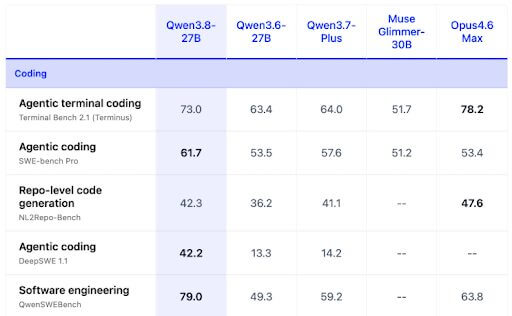
Further reading: Kimi K3 benchmarks, specs, and pricing | Cognition: SWE-1.7 | Cognition: Frontier Code 1.1 | https://ollama.com/library/qwen3.8
Local AI Hardware Is Catching Up
Most developers simply didn’t have the hardware to run anything beyond small LLMs, but that’s changing quickly. Purpose‑built hardware for local inference has opened the door to running serious models on‑premises. Workstation platforms like NVIDIA’s Spark‑class RTX systems and AMD’s Ryzen AI Halo now deliver enough compute to run full‑scale models locally without relying on cloud GPUs.
This shift matters financially, too. As token-based pricing keeps climbing, hardware starts to look like a more predictable, capital-expense alternative to highly variable cloud inference spending. Local inference isn’t a niche capability anymore. It’s becoming a practical, scalable, and economically predictable part of enterprise AI strategy, and it’s a tradeoff we’re seeing more of Keyhole’s clients weigh as they think through their own AI roadmaps.
My Local AI Stack: OpenCode, Ollama, and Qwen3
My goal was to run everything locally and without cost beyond electricity. To see how realistic local development has become, I set up a full agentic workflow on my own machine:
Local Agent: OpenCode
Model Orchestration: Ollama
Model: Qwen3
IDE: Visual Studio Code
This stack gave me local planning, local building, multi‑file reasoning, and zero cloud dependency.
The Hardware Behind My Local AI Setup
My machine isn’t cutting‑edge, but it’s still capable enough:
CPU: AMD 5950X
GPU: NVIDIA 3090 (24GB VRAM)
RAM: 64GB
Even though this hardware was released in 2020, at least it has some memory to run Qwen3 on.
insiderllm.com Recommendations
# 8 GB VRAM
ollama run qwen3:8b

# 12-16 GB VRAM
ollama run qwen3:14b

# 24 GB VRAM
ollama run qwen3:32b

# Coding-focused
ollama run qwen2.5-coder:32b
How Running AI Models Locally Actually Went
In an architect role, I rely heavily on planning agents, so my test was simple for my proof: Have OpenCode generate a plan file for review. I’ll iterate it until it is acceptable and then I’ll give the go-ahead for OpenCode to implement the plan.
OpenCode has two modes:
Plan mode, for code analysis and planning that is restricted from making file changes.
Build mode, for implementing the plan once it is finalized.
I had Plan mode sort out the Planning Prompt and then had Build Mode write the plan to file. Even though I’m running Qwen3 locally, I have the option to configure OpenCode to access models on other on-premise hardware or ones in the cloud.
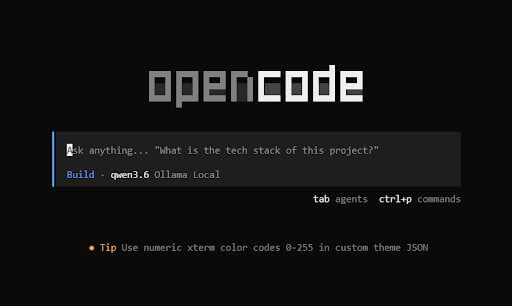
For my proof, I’m expanding my electronics-store app that I started with Windsurf (now Devin). The store needs a way for a user to register an account, so let’s start with the account registration feature. I kept the agent guard rails to only what is in the prompt to make it easier to keep the comparison of local versus cloud simple and without additional skills or agent files.
Stored in the repo: userstory\user-registration\planning-prompt.txt
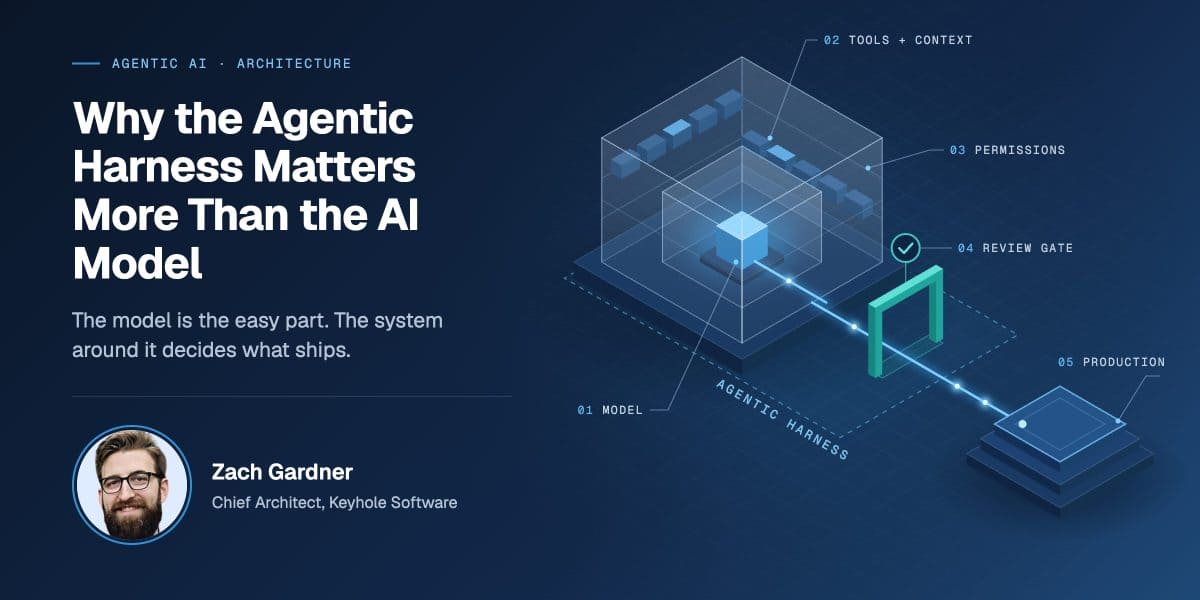
When Build mode was reading the prompt, it noticed a requirement contradiction and halted. This was a pleasant surprise. This may be due to the OpenCode agentic harness rather than the model. You need a quality agentic harness along with a quality model to get the best results.
=====================
I see a contradiction: work order step 2 says remove admin-role-if block, but Critical Constraints also say first user gets ROLE_CUSTOMER only, which conflicts with AC-REG-08 requiring first-user ROLE_ADMIN promotion. I'll follow the explicit critical constraint and document this.
=====================
Compared to using ChatGPT, planning time increased as expected due to my older hardware but was still reasonable. Once the plan was generated, the build phase was predictable. Qwen3 handled multi‑file generation, scaffolding, and iterative refinement without any more user effort than with ChatGPT. It did surprise me that the app ran with the user account feature implemented correctly the first try.
The time it took OpenCode with Qwen3 to produce the plan is a huge time savings compared to doing it manually. A full planning pass that would normally take me hours of architectural thinking, file mapping, dependency tracing, and workflow design was generated in just 1 minute and 31 seconds.
▣ Plan · qwen3.6 · 1m 31s
Instead of wondering how much time is left building, it is nice to see a sidebar noting what step the builder was on:
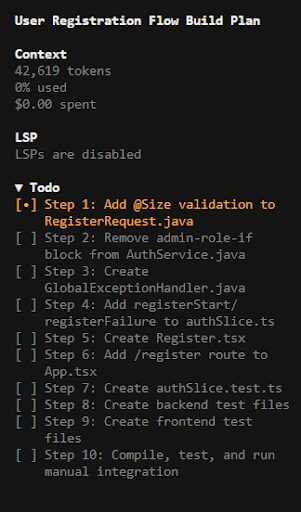
The UI screens below demonstrate the practical outcome of that plan. The Register page and Profile page weren’t hand‑coded, they were produced by the local agent following the plan shown in the sidebar.
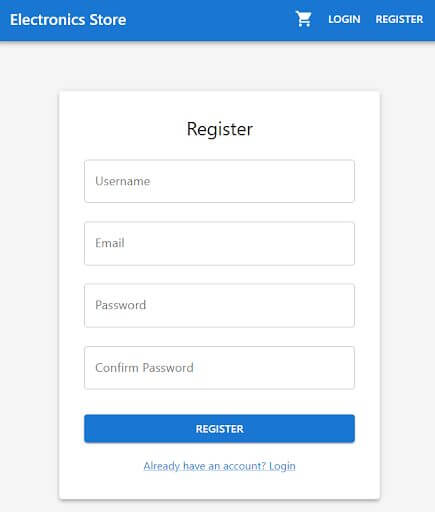
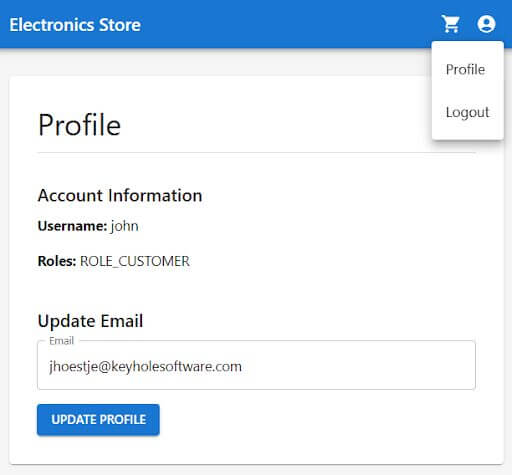
Even more important than seeing the agent follow the plan is the quality of the output. The locally‑run model produced UI screens and application logic that were fully on par with what I normally expect from cloud‑hosted frontier models. The registration flow, routing, validation, and profile page all came together cleanly.
What Surprised Me About Running AI Models Locally
Another surprise: Ollama automatically powers down the model after a period of inactivity, freeing up system resources without me having to manage it manually. Having the model available during the day and on a stand-by mode during the night is a real plus. Pairing this with the ability for Ollama to expose the model to others on the network allows for electricity use to be managed better.
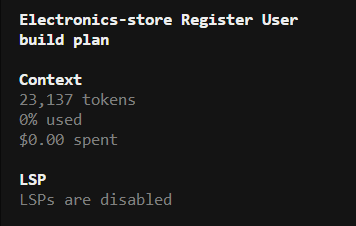
Always Interesting To Watch the Token Count
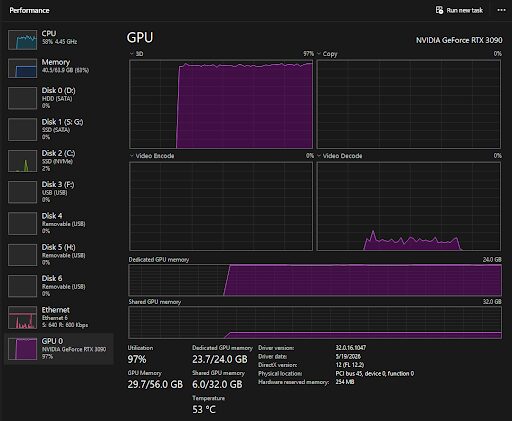
Even more interesting to watch the resources being utilized to the fullest
Although the prompts took a bit longer than I’m used to, I didn’t mind it. The extra wait gave me a beat to think through the next step instead of just reflexively accepting whatever came back, something you don’t get with an instant cloud response.
And I can use the agent and model to help determine configurations on my local machine without worrying about the sensitive info being sent to somewhere else. For example, I can use it to help determine what folders I should back up in case I need to restore my computer.
The Real Cost of Running AI Models Locally
Now the big question… how much does it cost to run!?
I expected my energy bill to spike when running inference on an NVIDIA 3090, but the numbers were surprisingly reasonable. The system averaged about 486 watts at the wall, which works out to a little over $2.10 per day at typical residential electricity rates and that’s assuming it runs 24 hours straight.
Of course, raw energy cost isn’t the whole story. What really matters is cost per token and how many tokens per second the hardware can sustain. A cheap setup isn’t useful if it only pushes 3 tokens per second and leaves you with the same bottlenecks and delays you’d face with a throttled cloud provider. The economics only make sense if the hardware can deliver consistent throughput at a predictable cost.
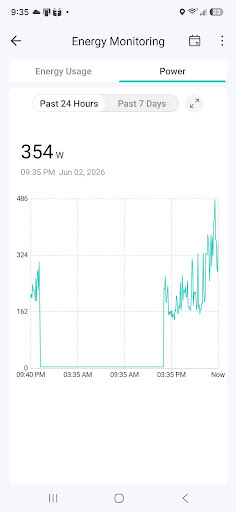
My experience follows what others have observed with similar hardware and I’ll let them break it down deeper in terms of tokens. Thank you towardsdatascience.com. My hardware *should* be averaging 30 tokens/second per Ollama but embarrassingly it isn’t.
No rate limits.
No throttling.
No surprise model swaps.
No “model is unavailable” responses.
Just pure, local autonomy.
The Future Is More Local
Running models locally isn’t just a cost‑saving trick, it’s a strategic shift. It gives developers control over their workflow, stability in their tools, and freedom from unpredictable cloud constraints. It allows experimentation without worrying about token budgets. It keeps development private. And it scales in a way that cloud pricing simply doesn’t.
This isn’t unique to one team’s stack, either. Any organization weighing AI cost against control, whether that’s a five-person startup or an enterprise engineering team, runs into some version of this same tradeoff. If a team has a budget to spend on a cloud offering, then that same budget will generally cover the hardware for running locally.
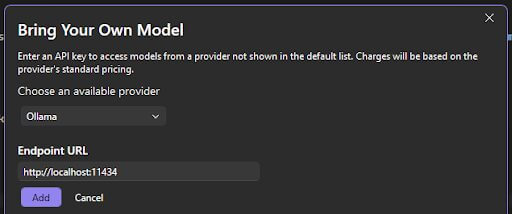
Developers aren’t limited to open‑source agent harnesses anymore. More and more tools now let you choose a local model directly, making it easier to run full agent workflows without relying on a cloud provider.
Visual Studio Pro
Hardware is accelerating. Models are becoming more efficient. And the economics of cloud AI are pushing teams to rethink their approach.
Local models are about to go mainstream. And honestly, I’m ready for it.
More From John Hoestje
About Keyhole Software
Expert team of software developer consultants solving complex software challenges for U.S. clients.
Share This Post
Join The Thousands Of Devs Who Subscribe
Discuss This Article
Subscribe
Login
0 Comments
Oldest