
AI Coding Tools in Enterprise Software Delivery: An Architect’s Workflow
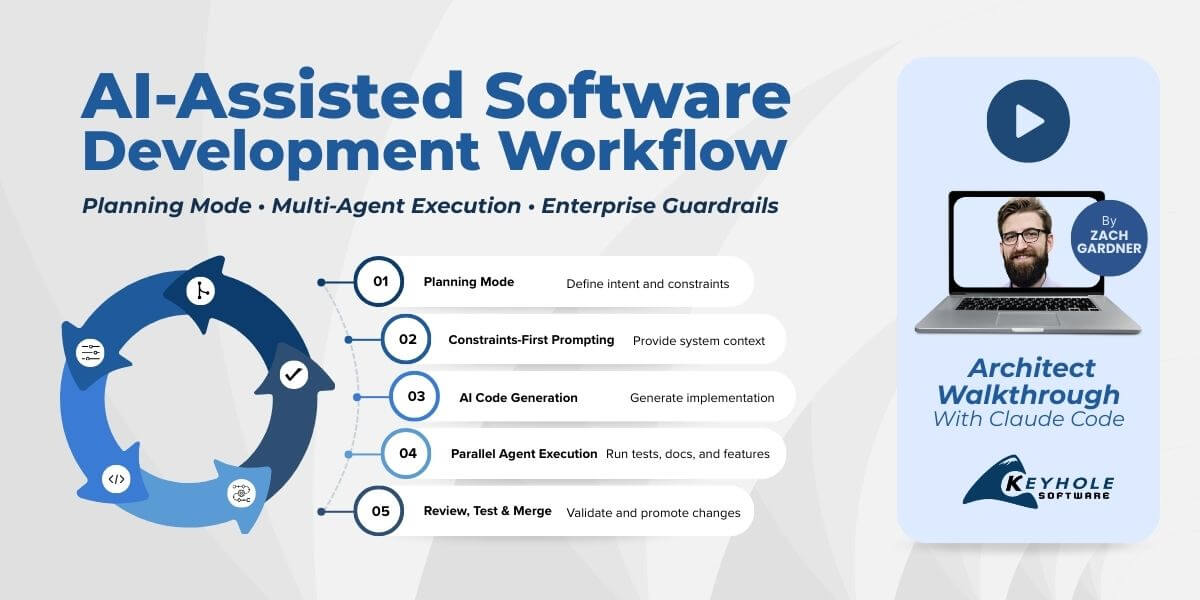
Watch the architect walkthrough below to see how AI coding tools operate in a real enterprise software delivery workflow. In the video, Keyhole Software Chief Architect Zach Gardner demonstrates planning mode, constraints-first prompting, multi-agent workflows, and the SDLC guardrails that make AI usable in production environments.
AI coding tools are everywhere, but most teams are still experimenting in isolated demos. Most organizations experimenting with AI coding tools quickly discover that moving from prototypes to a governed enterprise AI software development workflow is where the real challenge begins.
The real challenge isn’t generating code. It’s integrating these tools into production software delivery in a way that preserves quality, traceability, and governance. Since these tools allow for an order of magnitude more software to be written, failure to ensure they are used effectively by practitioners will result in an order of magnitude more issues.
Many organizations experimenting with AI coding tools quickly discover that getting them to work reliably in enterprise environments requires architectural guidance. Integrating AI-assisted development into an existing SDLC — while preserving testing, traceability, and governance — is often where internal teams struggle and where experienced AI software development consultants can help.
In this architect-level walkthrough, Keyhole Software Chief Architect Zach Gardner demonstrates how we use tools like Claude Code inside a real delivery model — with planning mode, constraints-first prompting, multi-agent workflows, and the guardrails required for enterprise environments.
This is the difference between vibe coding and a production-ready enterprise AI software development workflow.
What Is an Enterprise AI Software Development Workflow?
An enterprise AI software development workflow is a governed delivery model where AI coding tools generate code within the controls of a traditional SDLC. This includes planning mode prompting, branch-based development, automated testing, pull request review, and controlled promotion across environments.
Key moments in the walkthrough:
- Developer → orchestrator (03:26)
- Constraints-first prompting (08:05)
- Planning mode workflow (12:04)
- Parallel multi-agent delivery (28:30)
- Enterprise guardrails (41:59)
The Mindset Shift in AI-Assisted Software Development: Developer → Orchestrator
One of the biggest changes in AI coding tools in real software delivery is not the technology. It is the role of the developer.
When AI generates implementation, the primary value of an experienced engineer shifts from typing code to defining intent, setting constraints, and governing outcomes. In an enterprise AI software development workflow, this orchestration layer determines whether AI becomes a delivery accelerator or a source of risk. This requires developers to flip their perspectives around.
Rather than being the one to implement requirements, they must clearly articulate to the AI agent what those requirements actually are.
Instead of working sequentially, the developer now coordinates a system that includes:
- Structured prompts that function as executable requirements
- Multiple parallel workstreams handled by AI agents
- Reviewable, branch-based changes
- Automated validation through tests and CI/CD pipelines
It’s a fundamental change in responsibility and roles. In practice, the role begins to resemble a blend of a:
- Product owner translating business goals into clear, testable intent
- Software architect defining system boundaries and constraints
- Delivery lead orchestrating parallel implementation and review
You get to spend more time making decisions and architecting systems, which leads to more software getting written. Backlogs shrink and opportunities to generate more revenue increase, so it’s easy to see why executives are so keen to equip their development teams with these kinds of tools.
Honestly, senior engineers see the largest productivity gains from AI-assisted development. The quality of the output is directly tied to:
- How well the problem is framed
- How clearly success criteria are defined
- How effectively changes are reviewed and merged into the SDLC
Less experienced teams often focus on how quickly AI can generate code. High-performing teams focus on how reliably that code can move through a governed delivery process. Imagine, with a toolset that accelerates the ability to write code, if it’s not done under proper supervision then you get an order of magnitude more poor code than before.
From an organizational perspective, this mindset shift enables:
- Higher throughput without increasing team size
- Clearer traceability from business intent to implementation
- Stronger architectural consistency across parallel work
In other words, the developer becomes the orchestrator of a delivery system powered by AI, and that orchestration is now the primary driver of speed, quality, and scalability.
“Most Probable” Is Not Correct: Why Governance Is Required for AI in Enterprise Software Delivery
One of the most important things to understand about AI coding tools is that they are designed to return the most probable answer, not the correct one.
When I’m building a system, I’m not looking for something that is probably right. I need something that is verifiably correct, testable, traceable, and aligned with the architecture and the requirements. The model will always give you an answer, even when the prompt is incomplete. That means you have to bring a healthy level of skepticism and a governed workflow around it.
Without delivery controls, AI-generated code introduces real risk into the SDLC. You end up with:
- Changes that are not reviewable
- Defects that are harder to detect
- Commits that no one clearly owns
- No clear traceability from intent to implementation
The Guardrails That Make This Work in Production
In my workflow, AI operates inside the same controls as any other contributor to the codebase. That means:
- Every change happens on a branch
- Every merge is reviewed
- Automated tests validate behavior
- Commit and push behavior is controlled
I do not let an agent run unrestricted git commands. I do not let it make direct changes to protected branches. Those controls are not friction. They are what make this usable in a real delivery environment.
Once those guardrails are in place, the dynamic changes completely. Now I can:
- Run multiple agents in parallel
- Review their work like any other pull request
- Accept, reject, or refine changes with full traceability
That is where the acceleration comes from. I can defer trivial or low-level tasks to it while I spend more time focusing on higher reward activities, occasionally checking in on it to make sure it hasn’t gone into left field.
Governance Is What Makes AI Enterprise-Ready
In an enterprise environment, software delivery is not just about generating code faster. It is about moving changes through a repeatable, auditable, compliant process. Branch protection, pull request review, controlled promotion across environments, and clear ownership are already part of a mature SDLC. AI has to fit inside that system. Especially for mature teams, this makes it much easier to slowly start incorporating into their processes. AI agents do especially well at understanding existing codebases, and adhering to their standards.
The teams that are getting real value out of these tools are not the ones generating the most code. They are the ones that can take AI-generated changes and move them through a reviewable, testable, production-ready delivery pipeline.
Constraints-First Prompting: Why Context Determines the Quality of AI-Generated Code
The quality of the output you get from an AI coding tool is directly tied to the quality of the context you provide.
One of the biggest mistakes I see is starting with a vague prompt and expecting production-ready results. In real software delivery, we never begin implementation without understanding the environment the system has to run in. The same principle applies here.
In the walkthrough, I spend a significant amount of time defining the constraints before generating any code.
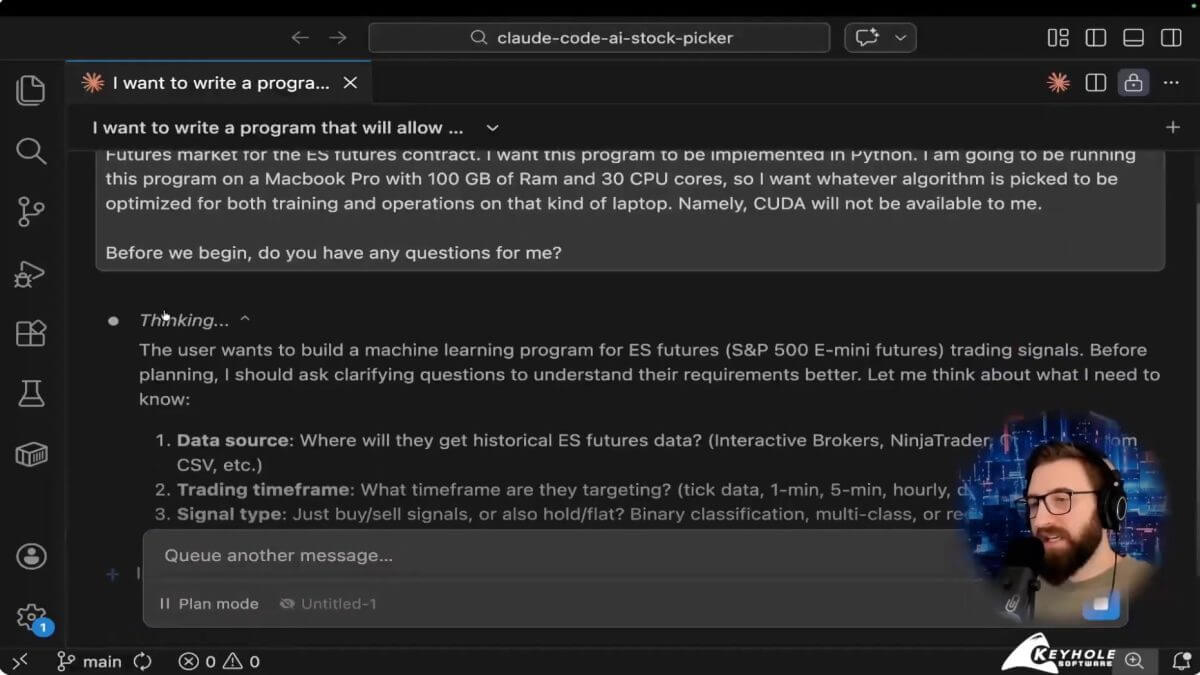
That includes:
- The runtime and language choice
- The hardware the solution has to execute on
- Whether GPU acceleration is available
- The shape, format, and volume of the data
- The performance and optimization target
- What “success” actually means from a business perspective
Once those constraints are clear, the model can make better architectural decisions and generate code that is aligned with how the system will actually be used. (See: 00:08:05)
This is exactly how I recommend our clients think of and use these kinds of tools. Your software’s capabilities will always be defined in part by how clearly the requirements were articulated as well as understood. This is no different for these AI-enabled systems.
This Is How Experienced Engineers Already Work
This approach is not new. It mirrors how senior developers build software today.
In this example, I need to understand several important constraints so I can ensure the code the agent produces will even run effectively:
- Where is this going to run? (On local infrastructure, inside a container platform, or in a cloud-native environment?)
- What are the resource limitations?
- What does the data really look like?
- What are we optimizing for?
Those answers shape every technical decision that follows. Even in a medium-sized problem that I walked through in this video, these kinds of concerns made a material difference in the code that it generated.
The difference with AI-assisted development is that if you do not explicitly provide that information, the model will assume something for you. And those assumptions are often wrong for your environment. There are some ways you’ll learn to anticipate and iterate on it, namely in Chain of Thought reasoning. Eventually it becomes a second nature, but it’s not something most people understand overnight.
Translating Business Intent Into System Behavior
Another key part of constraints-first prompting is defining success in measurable terms.
In the example from the video, I do not just ask the model to generate buy and sell signals. I explain how the system should be optimized based on net outcomes over time, because that is what actually matters in production. That kind of subtle difference I’ve never seen an agent pick up without me having to prompt it. Again, your software is only as good as your ability to articulate what you’re truly after.
That is the same skill we use in real projects. We take a high-level goal and translate it into something the system can evaluate and execute reliably.
Why This Matters for Enterprise AI Software Development Workflows
In an enterprise environment, systems do not run in a vacuum. They run:
- On specific infrastructure
- Within defined performance envelopes
- Against real, imperfect data
- Under architectural and compliance constraints
Constraints-first prompting ensures that AI-generated code fits into that reality the first time. It reduces:
- Rework
- Architectural drift
- Invalid assumptions
- Performance failures in later environments
Most importantly, it allows AI coding tools to produce output that can move directly into a governed SDLC, instead of becoming a throwaway prototype.
Better context does not just improve the code. It is what turns AI-assisted development into a production-ready, enterprise-capable delivery model.
Planning Mode and Iterative Prompting: The Fastest Path to Production-Ready Code
The fastest way to get bad code out of an AI coding tool is to ask it to generate code immediately. The fastest way to get good code is to start in planning mode.
When I begin a new workflow, I do not treat the model like an autocomplete engine. I treat it like a senior developer who has just joined the project. I want it to ask questions first so we can align on intent, constraints, and success criteria before anything is generated. (See: 00:12:04)
In practice, the workflow looks like this:
- Enter planning mode
- Let the model ask clarifying questions
- Refine the problem statement
- Iterate on the prompt until the questions stabilize
- Then move into code generation
That process produces dramatically better results because architecture decisions are being made with the right context.
It also compresses what is normally a long back-and-forth between product, architecture, and development into a few minutes. Instead of discovering misunderstandings halfway through implementation, you resolve them up front.
The output is:
- Fewer rewrites
- Clearer structure
- Reviewable assumptions
- Traceable intent from requirement to implementation
Since I’ve built the code on a correct architectural foundation, the probability that it produces what I’m after increases substantially.
Multi-Agent AI Coding Workflows: Running Parallel Development With Branches
The biggest delivery acceleration does not come from generating a single file faster. It comes from running multiple workstreams in parallel.
In the video, I show how I clone the same repository into multiple working directories and assign each agent a specific responsibility. For example:
- One agent writes unit tests
- One updates documentation
- One implements a feature change
- One performs a code review
- Each of these operates on its own branch. (See: 00:28:30)
At that point, my role changes. I am no longer waiting for one task to finish before starting the next. I am doing one, or many, of the following concurrently:
- Monitoring parallel workstreams
- Reviewing changes
- Accepting, rejecting, or refining pull requests
It allows me to work on the hardest things with the most amount of brainpower, and defer the trivial, though necessary, to an agent that can do it while I work on truly more important tasks.
This is how you increase throughput without increasing headcount. The work is no longer constrained to a single human doing tasks sequentially. It becomes a coordinated system where implementation, testing, and documentation can all move forward at the same time.
And because everything is branch-based, it remains fully governed and reviewable. Sometimes I completely throw away a branch because I don’t like what it generated, though to be fair this is often because I didn’t explain what I wanted well.
Moving from AI experiments to governed delivery? We help teams integrate AI coding tools into real SDLC workflows without introducing risk. Talk with an architect.
Enterprise Guardrails for AI Coding Tools: The Controls That Make AI Usable in Production
AI-generated code has to follow the same delivery controls as code written by a human. In my workflow, agents do not get a free pass to do whatever they want in the repository. I do not allow unrestricted git operations, and I do not allow direct changes to protected branches. (See: 00:41:59)
Instead, AI operates inside a standard, governed SDLC:
- Branch protection is enforced
- All changes go through pull request review
- Commit and merge behavior is controlled
- Agent work is isolated to dedicated branches
- Tool usage aligns with procurement and compliance requirements
Those controls are not friction. They are what make this model viable in:
- Regulated industries
- Large organizations
- Long-lived systems
Without them, you have an ungoverned code generator. With them, you have a delivery accelerator that produces:
- Auditable changes
- Clear ownership
- Repeatable promotion across environments
- Architectural consistency over time
Enterprise software delivery is not just about speed. It is about moving changes through a reviewable, testable, compliant pipeline. AI has to fit inside that system.
Why Experienced Teams Get Better Results With AI Coding Tools
The biggest misconception I see is that AI reduces the need for experienced software engineers. In practice, the opposite is true. AI is very good at generating output. It is not good at understanding whether that output is correct for your system, your architecture, your constraints, and your delivery process. That still requires engineering judgment.
The teams that get the largest gains from AI-assisted software development are the ones that already know how to:
- Design systems with clear boundaries
- Translate business intent into testable requirements
- Operate inside a governed SDLC
- Build for real production environments
Those skills determine whether the model’s output can move forward or has to be rewritten.
When that foundation is in place, the impact is significant. You see improvements in:
- Delivery speed, because multiple workstreams can move in parallel
- Code quality, because everything is generated and validated inside a reviewable process
- Architectural consistency, because changes are guided by people who understand the system
AI does not remove the need for software engineering expertise. It amplifies the effectiveness of teams that already have it. If you do not understand the system you are building, you cannot effectively guide the tool. If you do, the productivity gains are real and repeatable. If you don’t know the right questions to ask, AI makes the problem worse rather than better.
When Should Teams Adopt AI Coding Tools in Software Delivery?
AI coding tools are most valuable when development teams already operate within a structured software delivery process.
Organizations see the greatest impact when they already have:
- Defined architecture standards
- Branch-based development workflows
- Automated testing pipelines
- Clear review and promotion processes
In these environments, AI can accelerate implementation while the existing SDLC ensures quality, traceability, and compliance.
Teams without those foundations often struggle to move beyond experimentation because AI-generated code cannot safely move into production systems.
Common Challenges When Adopting AI Coding Tools in Enterprise Teams
Many teams experimenting with AI coding tools encounter similar challenges when moving from prototypes to production delivery:
- Lack of governance around AI-generated code
- Difficulty integrating AI workflows into an existing SDLC
- Managing multiple AI agents without introducing instability
- Ensuring AI-generated code meets architectural and security standards
- Maintaining traceability between requirements and generated code
These challenges are why many organizations seek guidance from experienced AI software development consultants when implementing AI-assisted software delivery workflows.
How We Help Teams Adopt a Governed AI Software Development Workflow
Most organizations we talk to are past the experimentation phase. They are no longer asking whether these tools are useful. They are trying to figure out how to use them in real delivery without introducing risk.
That is the gap we focus on. We work with teams to:
- Evaluate AI coding tools based on how they perform in production scenarios, not demos
- Design governed adoption workflows that fit their existing SDLC
- Integrate AI into branch, testing, and promotion strategies
- Apply this model to modernization efforts and new platform delivery
Because we are doing this inside active client engagements, the guidance is based on what is actually working in real environments.
This is not about replacing your developers or introducing a new process. It is about enabling your existing teams to:
- Move faster
- Maintain quality
- Keep full traceability and compliance
If your organization is moving from isolated experiments to production use of AI in software delivery, we are happy to share what we are seeing work and where the common failure points are.
Watch the full workflow in action.
👉 Talk with an architect about adopting AI coding tools in your software delivery workflow.
More From Zach Gardner
About Keyhole Software
Expert team of software developer consultants solving complex software challenges for U.S. clients.
Share This Post
Join The Thousands Of Devs Who Subscribe
Discuss This Article
Subscribe
Login
0 Comments
Oldest