
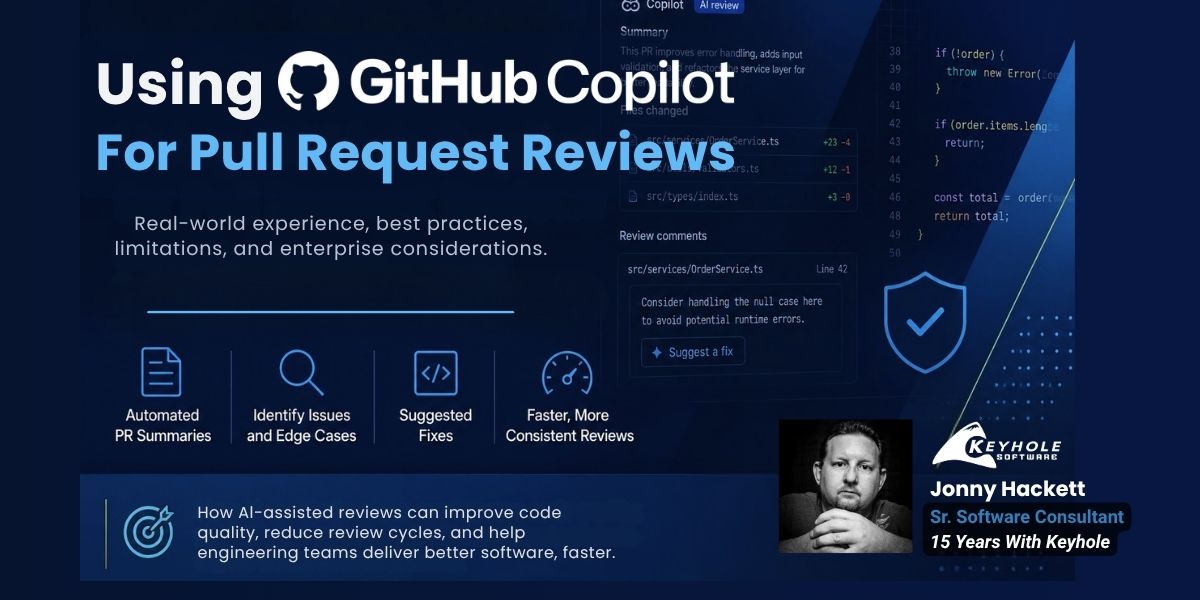
Using GitHub Copilot for Pull Request Reviews: Benefits, Best Practices, and Real-World Experience
Every development team is constantly looking for ways to improve efficiency and code quality; that’s nothing new and a core tenet of Agile development. As AI-assisted software development continues to evolve daily, many organizations are investing heavily in tools that can accelerate delivery without sacrificing quality.
One increasingly popular use case is using GitHub Copilot for pull request reviews. Effective pull request (PR) code reviews are important to catch bugs, improve code quality, enforce coding standards, and share knowledge across the team. But quality code reviews can also be time-consuming, inconsistent, and sometimes painful.
While most developers think of Copilot as a tool for assisting in writing code (Copilot Chat) or autocompleting code (Copilot plugin in your favorite IDE), it’s during pull request reviews that I find Copilot the most impressive. GitHub Copilot can analyze code changes, generate summaries, identify potential issues, and even suggest fixes before another developer ever opens the PR.
In this article, I’ll share how I’ve been using GitHub Copilot for PR reviews, where it provides the most value, where it falls short, and the best practices I’ve found for incorporating it into an effective code review workflow.
Benefits of Using GitHub Copilot for Pull Request Reviews
GitHub Copilot is one of several AI code review tools now being integrated into modern software development workflows. Let’s talk about some of the pros of using GitHub Copilot for PR reviews:
Instant Feedback Before Human Review
When a developer creates a pull request and requests a Copilot review, they receive structured, actionable feedback within minutes.
Earlier feedback reduces review cycles, improves consistency across teams, and allows senior developers to spend more time on architectural decisions instead of routine code quality checks.
Review Draft Pull Requests Earlier
One of the biggest advantages of GitHub Copilot is that it can review draft pull requests before another developer ever gets involved. A developer can commit early, commit often, and request draft PR reviews by Copilot early in the process and before involving the rest of the team.
Automated PR Overview
Copilot does an uncanny job of generating an overview and per file summary of the code changes in the PR, even for complex code changes and refactors. For reviewers, this provides valuable context before diving into the implementation details, making it easier to understand what changed and why. The larger the pull request, the more valuable these summaries tend to become.
One-Click Code Implementation
When Copilot flags code as a potential issue, it will often propose a fix that can be implemented with a click of a button within the GitHub web interface. For straightforward improvements, this can eliminate unnecessary back-and-forth during the review process. More complex suggestions may require additional review and discussion, but even then Copilot provides a useful starting point that can speed up implementation.
Consistent Code Reviews Across Teams
One advantage that becomes more apparent in larger organizations is consistency. GitHub Copilot applies the same review approach across repositories and development teams, helping establish a more uniform review experience regardless of who authored the pull request. Human reviewers naturally have different perspectives and priorities, but Copilot provides a more consistent first pass that helps identify common issues and reinforce coding standards before the review reaches the rest of the team.
Common Issues GitHub Copilot Can Identify
While results vary, GitHub Copilot often performs well at identifying:
- Missing null checks
- Potential exception paths
- Edge cases in unit tests
- Inconsistent naming conventions
- Duplicate logic
- Unused code
- Potential validation gaps
- Readability concerns
It is particularly effective at highlighting issues that might otherwise require a reviewer to carefully inspect multiple files.
GitHub Copilot pull request reviews are one example of how AI is becoming embedded throughout the software development lifecycle. I’ve talked at length about using it for unit testing. As discussed in our article on AI coding tools in enterprise software delivery, the most successful teams combine AI assistance with strong engineering practices and architectural oversight.
GitHub Copilot Pull Request Review Example
Here’s an example of Copilot’s ability to generate a PR request overview.
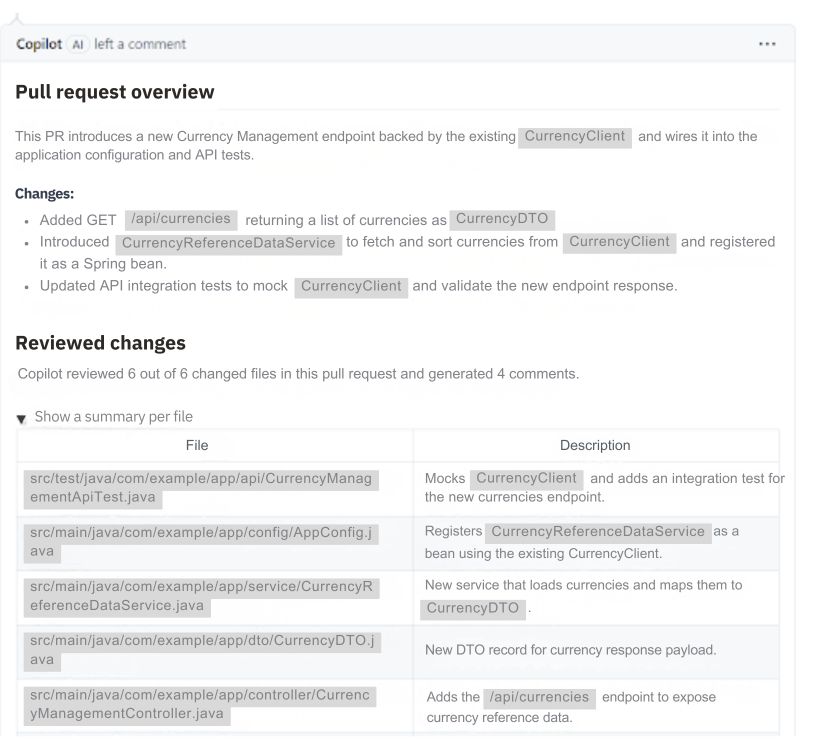
It includes a short description based on examining the changes in code within the context of the repo. It also provides an outline of the code changes, states the number of files it reviewed, and how many comments it generated that require resolving.
At the end, it shows a list of the files and a descriptive summary of what was changed within each file.
Example of an Issue Identified by GitHub Copilot
When GitHub Copilot finds a potential issue, it will generate comments and often a potential fix.
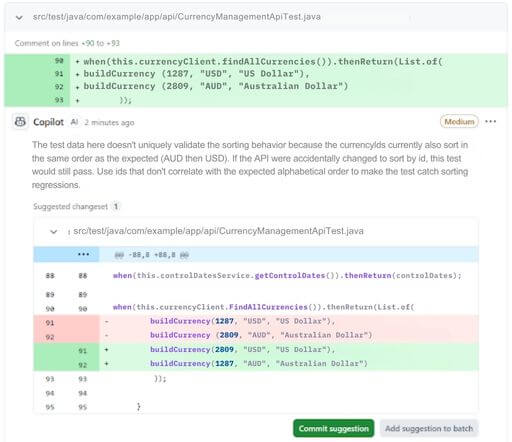
In this example, Copilot highlighted an edge case in which the test wouldn’t cover if the API changed the currency sorting behavior.
In looking at edge cases, it recognized that if the service behind the API ever changed the sorting behavior to sort by currency ID instead of currency name, the test would still pass due to the order of the ID in the mocked data.
That’s exactly the kind of subtle issue that can easily be overlooked during development.
If I agreed with the suggested fix, I could click the “Commit suggestion” button and it would commit that suggestion. This works well for simple suggestions such as this. If the suggested fix was more complicated, it would work a little differently in a batch mode behind the scenes and create its own branch for the commit.
What I found a bit amusing for this review comment is that I had used GitHub Copilot to generate the tests, so you would have thought it would catch that during the test generation.
One thing I’ve found after using Copilot for pull request reviews is that it does have a knack for understanding the surrounding context and expanding it enough to identify potential problems I hadn’t considered. There have been times where Copilot has genuinely changed my mind about a particular implementation or approach. It’s usually less about blindly accepting the suggestion and more about understanding the reasoning behind why it flagged something in the first place.
That doesn’t mean every comment should result in a code change. It’s still up to the developer to decide whether the suggestion makes sense for the codebase.
For more significant comments, I also like to get another set of eyes on it during peer review. Copilot is another source of feedback, but it’s the combination of AI and experienced developers that leads to the best outcome.
Limitations of GitHub Copilot PR Reviews
Like any AI tool, GitHub Copilot isn’t perfect. It provides a lot of useful feedback, but there are still some limitations to keep in mind. I’ve found it works best as another reviewer that provides additional input before a human review takes place.
Issues to be aware of when utilizing GitHub Copilot for PR reviews:
Over Reliance on AI Feedback
When you see what Copilot offers for code reviews, it’s easy to become too trusting of the results. You still need human judgement to decide if the comments generated warrant changes. Copilot should assist, not replace developers.
Review Noise and False Positives
Sometimes Copilot can be a bit nitpicky in some of the comments generated. If there’s too much noise, some of the important aspects of the review might be overlooked. Even if I don’t agree with a suggestion, I still like to understand why Copilot flagged it before deciding whether to ignore it.
Lack of Business Context
Copilot can pick up on a surprising amount of technical context from the code, but it doesn’t understand the business requirements behind the implementation. It doesn’t know why certain decisions were made or what tradeoffs the team may have considered. Good code comments and meaningful pull request descriptions can help provide some of that context, but you still need a final human review.
When GitHub Copilot PR Reviews Provide the Most Value
In my experience, GitHub Copilot delivers the most value as a first-pass reviewer before another developer begins reviewing the code. The earlier feedback helps developers address straightforward issues and edge cases before involving the rest of the team.
Some scenarios where Copilot works particularly well include:
- Reviewing draft pull requests before requesting human feedback
- Identifying potential edge cases in unit and integration tests
- Catching simple code quality issues and inconsistencies
- Generating summaries for large pull requests and refactors
- Providing an initial review when team members are unavailable
- Helping maintain consistency across multiple repositories
The larger and more complex the pull request, the more valuable the automated summaries become. While large refactors can be hit or miss when it comes to generating actionable comments, I’ve found that Copilot often provides food for thought. There have been times where its feedback has caused me to rethink an approach or look more closely at a potential issue that I might have otherwise dismissed.
I’ve also seen developers quickly dismiss Copilot’s suggestions without taking the time to understand the reasoning behind them.
Even when I don’t ultimately agree with a recommendation, I think it’s worth considering the context and implications before moving on.
That’s another reason why human reviews remain an important part of the process—AI can surface potential concerns, but experienced developers are still needed to determine whether those concerns are valid for the application and business problem being solved.
GitHub Copilot vs Human Code Reviews
GitHub Copilot and human reviewers aren’t competing, but rather they’re solving different problems. AI excels at providing fast, consistent analysis of code changes, while experienced developers contribute architectural knowledge, business context, and engineering judgment.
| Review Area | GitHub Copilot | Human Reviewer |
|---|---|---|
| Code quality issues | Excellent | Excellent |
| Edge case detection | Good | Good |
| Consistency | Excellent | Variable |
| Speed | Excellent | Variable |
| Architecture decisions | Limited | Excellent |
| Business requirements | Limited | Excellent |
| Team knowledge sharing | Good | Excellent |
GitHub Copilot and human reviewers serve different purposes. Copilot excels at quickly identifying potential code issues, highlighting edge cases, and providing consistent feedback across pull requests. Human reviewers bring architectural knowledge, business context, team conventions, and product understanding that AI simply cannot replicate.
The most effective teams use both. By allowing Copilot to handle an initial pass on a pull request, developers can resolve straightforward issues early and give human reviewers more time to focus on higher-value concerns such as maintainability, design decisions, business requirements, and long-term system health.
A Practical Workflow for Using GitHub Copilot in Code Reviews
A workflow that has worked well for our team is:
- Create a draft pull request.
- Request a GitHub Copilot review.
- Address obvious issues and suggestions.
- Request feedback from human reviewers.
- Focus human reviews on architecture, maintainability, and business requirements.
- Merge once both automated and human review concerns are addressed.
This approach helps reduce review overhead while preserving the human judgment necessary for high-quality software delivery.
Best Practices for GitHub Copilot PR Reviews
Based on my experience, I would recommend enabling GitHub Copilot pull request reviews for just about any development team already using GitHub Copilot. It’s helped fill in some gaps in our review workflow by providing fast, consistent feedback before another developer begins reviewing the code. While developers and reviewers are the obvious benefactors, the business ultimately benefits from cleaner code, improved efficiency, and fewer issues making it through the review process.
To get the most value from Copilot reviews:
- Keep pull requests focused and reasonably sized
- Write meaningful PR descriptions to provide additional context
- Use draft pull requests early to identify straightforward issues before requesting human review.
- Review Copilot’s suggestions critically rather than accepting them automatically.
- Don’t skip human review—Copilot should complement experienced developers, not replace them.
- Document important business rules and assumptions in code comments where appropriate to give both Copilot and human reviewers additional context.
Teams adopting Copilot PR reviews should view them as another layer of feedback rather than the final authority. The best results come from combining AI-assisted reviews with thoughtful peer reviews and engineering judgment.
Final Thoughts on GitHub Copilot for Code Reviews
GitHub Copilot is not just a coding assistant, it’s a powerful code review partner. When used thoughtfully, it speeds up reviews, improves code quality, and helps teams maintain consistency. But it’s not magic. Human reviewers still provide the judgment, context, and product understanding that Copilot can’t replicate.
The best teams use Copilot as another team member: a tool that handles the mechanical parts of review so humans can focus on what matters most.
For organizations evaluating AI-assisted software delivery, GitHub Copilot pull request reviews represent one of the lowest-friction ways to improve developer productivity while strengthening existing engineering practices. The greatest return comes not from replacing human reviewers, but from enabling them to focus on the decisions that require experience, context, and architectural judgment.
More From Jonny Hackett
About Keyhole Software
Expert team of software developer consultants solving complex software challenges for U.S. clients.
Share This Post
Join The Thousands Of Devs Who Subscribe


Discuss This Article
Subscribe
Login
0 Comments
Oldest