
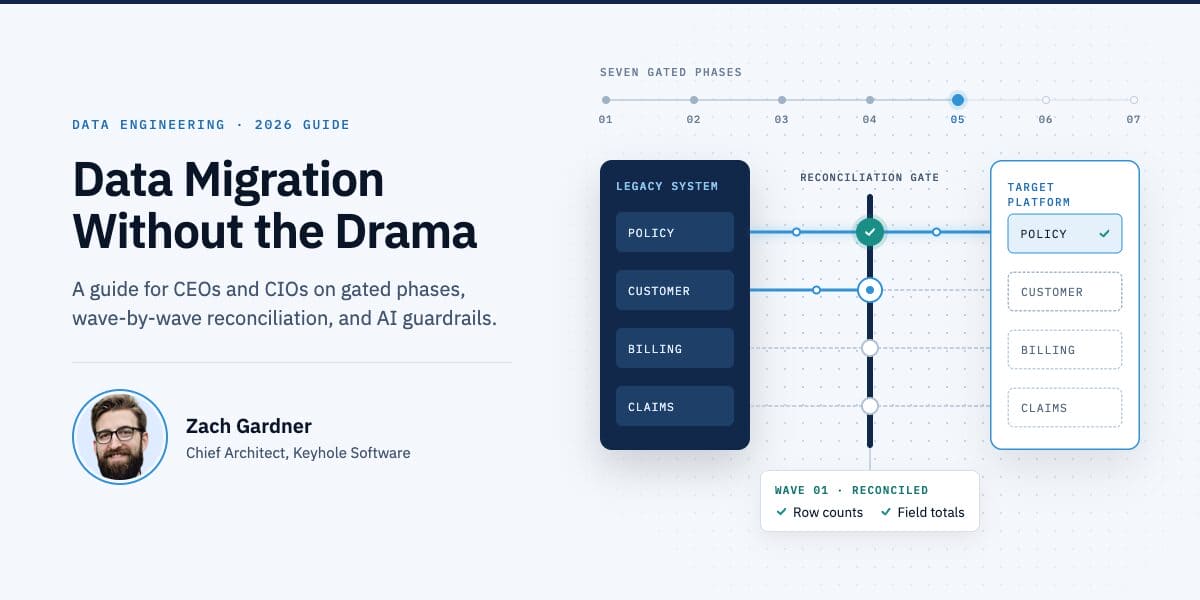
Data Migration Without the Drama: A 2026 Guide for CEOs and CIOs
Back in 2019, I wrote that three things are guaranteed in life: death, taxes, and at least two ETL projects in development by a hospital’s IT staff at any given time. I’d extend that well past hospitals now. Nearly every modernization program I’ve worked on has a data migration inside it, and it’s usually the part that gets the least attention until it’s the part running late.
Executive Summary
In my experience, data migration is where modernization budgets and schedules most often start to slip. The research points the same way, with caveats I cover below.
Most data migration risk can come out before development starts. Fund the migration separately with a named owner, and don’t approve a budget until the data has been profiled. The phases below cover the rest, and the checklist at the end lists the evidence to ask for at each gate.
Why Data Migrations Fail (and Who Can Prevent It)
Most data migrations run over time or budget. When I look at why, it’s usually data nobody profiled or business rules that only lived in old code, and the damage gets worse when there’s no rehearsed way back from cutover.
The published numbers aren’t encouraging, though they aren’t new, either.
- In an April 2017 survey of 270 data migration practitioners in more than 30 countries, run by Data Migration Pro and commissioned by Experian, only 36% of projects kept to their forecast budget, and 54% had some kind of delay.
- Bloor Research puts the share of data migration projects that overrun on time, budget, or both at more than 60%. Bloor doesn’t publish a sample size or date with that figure, but its explanation matches what I see: data migration usually gets treated as one part of an application project instead of a discipline of its own.
The two studies sampled different people, used different definitions, and are several years old, so I wouldn’t average them or read either as precise. I haven’t found a newer independent study. Our own 2026 process guide reaches the same conclusion, but that’s our judgment from client work, not a survey.
These are the root causes I see most often, and who’s in the best position to prevent each one.
| Root cause | How it shows up | Who prevents it |
|---|---|---|
| Data treated as a sub-task of the app project | No owner, no budget line; data work starts late and gets squeezed | CEO/CIO: fund it as its own workstream |
| Unprofiled legacy data | Inconsistent formats and duplicates surface mid-migration and trigger rework | CIO: require profiling before the budget is final |
| Undocumented transformation rules | Years of hidden business logic in code and batch jobs; the new system produces different answers | Business owners + architects: write every rule down |
| Hidden dependencies | Scheduled jobs, shared databases and file feeds break after cutover | Architects: map dependencies during assessment |
| Coexistence gaps | While old and new systems run together, files and formats don’t line up | Engineering: test the integration paths as well as the data |
| Big-bang cutover with no rollback | One failed weekend becomes a business outage | CIO: phased waves, rehearsed rollback, go/no-go criteria |
| Unchecked AI output | Fast conversions that nobody verified introduce silent errors | CIO: same quality gates for AI and human work |
The coexistence row is the one that surprises people, so here’s a real example.
On a mainframe modernization we worked on, the client moved batch programs to Java a few at a time, so old and new programs ran side by side and traded files over FTP. Limited testing said that worked. It didn’t. Files sent back to the mainframe were cut off because nobody had specified a record length, and the mainframe defaulted to 128 bytes. Files pulled down in ASCII mode picked up line terminators the mainframe never used, which shifted later records by a byte or two in code that read fixed-length records. And in one case the mainframe received a single 250-character record where there should have been thousands, because the new code never wrote line terminators at all.
Each fix turned out to be small: setting the record length with an FTP site command, reading one line at a time, and writing output with println. None of it showed up until ported programs started consuming each other’s files, though. Clayton Neff wrote up the details at the time. It’s the reason I put the integration paths between old and new systems into the rehearsal plan alongside the data.
Data Migration Best Practices: Seven Gated Phases
The data migration strategy I recommend is a gated, incremental program. Each phase below ends with a gate an executive can check before the next phase starts.
1. Discover and Scope
Write down the business reason for the migration in one sentence. Inventory every data source with its owner, volume, regulatory class, and downstream consumers, and decide early what to migrate, archive, or retire.
Gate: signed scope, a named business owner for each data domain, and a stated success metric.
2. Profile and Assess
Run automated profiling on every in-scope source to find missing values, duplicates, format drift, orphaned records, and out-of-range values. Map hidden dependencies like scheduled jobs, shared databases, and file feeds. I’d start this before the project formally begins.
Gate: a data-quality baseline, and a budget re-estimated from what profiling found.
3. Design and Map
Build a source-to-target mapping where every transformation rule is written down and approved by the business owner, and write the reconciliation specification at the same time. Compliance requirements like HIPAA, PCI-DSS, and SOC 2 belong in this phase.
Gate: mapping sign-off and a written reconciliation specification.
4. Build and Rehearse
Automate the migration end to end, so nobody is running scripts by hand on cutover night. Run mock migrations on production-sized copies and time each one.
Gate: a clean full rehearsal that finishes inside the planned cutover window.
5. Migrate in Waves
I prefer waves because they let the team find mistakes while the scope is still manageable. Start with a data domain whose dependencies you understand, reconcile the target against the source, and run down every unexplained difference before moving on. What matters most is that each wave is a decision point: the next one doesn’t start until the current one passes its checks.
Gate: each wave passes reconciliation before the next one starts.
6. Cut Over and Validate
Agree on rollback criteria before each cutover. For mission-critical systems, run old and new side by side and compare their outputs with automated regression tests.
Gate: go/no-go criteria met, with a named decision-maker.
7. Decommission and Optimize
Retire the legacy system once the parallel run meets its thresholds and archived data meets your retention policy, then record performance and cost baselines for the new system.
Gate: legacy retired, baselines recorded, and lessons fed into the next wave.
When Waves Are Worth the Cost
Waves have a real cost. Every wave you add stretches the period when both systems are live, which means two sets of infrastructure, sync jobs between them, and reconciliation running for months instead of weeks. Parallel runs add to that.
- For a small, well-understood dataset where the business can tolerate a short outage, I’d consider a single cutover with a rehearsed rollback.
- When a failed weekend would turn into a business outage, I’d pay for the longer overlap.
A Worked Example: Reconciling an Insurance Data Migration
This example is illustrative, not a specific client project, but the problems in it are common ones. Say an insurer is moving policy and customer data out of two legacy systems into one new platform.
Profiling turns up two things nobody had estimated. About 4% of customer records have no postal code, and roughly 30,000 customers exist in both legacy systems under slightly different names. Deduplication needs rules, the rules need a business owner, and the budget goes back for a re-estimate before anyone writes migration code. The missing postal codes get a rule of their own: those records migrate as-is, flagged for cleanup in the new system so customer service can fill them in on the next contact.
The mapping session settles the duplicates. When two records match on policy number and date of birth, the more recently updated one wins, and the other’s history is kept as an alias. The business owner signs that rule, and it goes into the mapping spec as configuration.
In the second full rehearsal, reconciliation fails the first wave. Row counts match at 1,204,331 policies, but premiums total $412,906,118.27 in the source and $412,905,962.04 in the target. The job stops the wave and sends the mismatch report to the migration lead and the data owner.
The cause is a column definition: the legacy system stored pro-rated premiums to three decimal places, the new column only holds two, and the load step truncated instead of rounding. Every pro-rated premium lost a fraction of a cent, and because truncation always cuts downward, the losses added up instead of canceling out.
The team widens the column and reruns the rehearsal, the totals match, and the data owner signs off on the rerun report. Only then is the wave cleared for production. Row counts alone would have passed this wave. That’s why I want reconciliation to compare totals on the fields the business cares about, not just how many rows arrived.
How We Run Data Migrations at Keyhole
At Keyhole, data migration gets its own workstream, and a senior architect reviews every increment.
We prefer configuration-driven, deterministic transformation. For a national healthcare technology client moving legacy on-premise databases to AWS, one of our consultants built a generic CSV-driven mapping library that turned query results into FHIR object graphs, so adding a dataset meant writing a new mapping file instead of new code. Today I’d have AI draft and test those mapping files and leave the transformation itself to that deterministic engine.
One gap I’ll own: we publish delivery-speed figures, but we haven’t published much on data-quality outcomes like records migrated, reconciliation error rates, or cutover downtime. Publicly, the most we can point to is case studies like the ones in this guide. Ask us for references on data-quality results specifically, and talk to those clients directly, the same as you would with any other partner.
Using AI in Data Migration Without Losing Accuracy
I use AI on migrations mostly for reading: extracting transformation rules from legacy code, drafting source-to-target mappings, and generating reconciliation tests. Two of our projects shaped how I think about it.
On a COBOL-to-Spring-Batch conversion, AI explained the legacy jobs and generated skeletons for the new ones, and developers still tuned the business logic by hand. The project reported a 20% to 30% cut in manual effort, which is our own measurement rather than an independent one. The code and data stayed in EnterpriseGPT, an in-house tool built so submitted data isn’t retained or used for training.
On a platform replacement for a Kansas City insurer, the team ran separate AI agents for database migrations, security analysis, service refactoring, and UI work. Each agent read a rules file first: a person approved every commit and push, schema changes needed a security check before they ran, and the code had to compile and pass its tests after every phase. The tools’ context limits also forced the team to keep daily notes outside the repositories and reload only the history each task needed.
Where AI Helps Most in a Data Migration
| Task | What AI does | What people own | Evidence |
|---|---|---|---|
| Discovery and rule extraction | Reads legacy code and batch jobs, maps dependencies, extracts embedded business rules | Deciding which rules still matter | BCG reports that one financial institution extracted more than 5,000 business rules in under three weeks (cited in our process guide) |
| Data profiling and anomaly detection | Flags duplicates, format drift and outliers; suggests data-quality rules | Deciding what to fix, keep or archive | My judgment; I haven’t seen a published benchmark I trust |
| Schema and code conversion | Converts stored procedures, functions and data types between database engines | Reviewing and approving each converted object | AWS says DMS Schema Conversion converts up to 90% of schema objects from commercial databases to PostgreSQL, with output shown for review before it’s applied (vendor claim) |
| Source-to-target mapping | Drafts mapping specs and transformation rules | Business-owner sign-off on every rule | Our practice. The FHIR mapping library worked the same way, before AI was involved |
| Legacy pipeline rewrite | Explains legacy jobs, generates skeletons for the new pipelines | Business logic and fine-tuning | Our COBOL to Spring Batch project reports 20% to 30% less manual effort (self-reported) |
| Tests and reconciliation | Generates reconciliation queries, regression tests and edge cases | Setting pass/fail thresholds | My recommendation for a first agent use; no published benchmark yet |
When AI drafts a mapping, I want the result to be a mapping spec that people can review and rerun, so the transformation itself lives in configuration.
Six Guardrails Before an AI Agent Touches Migration Data
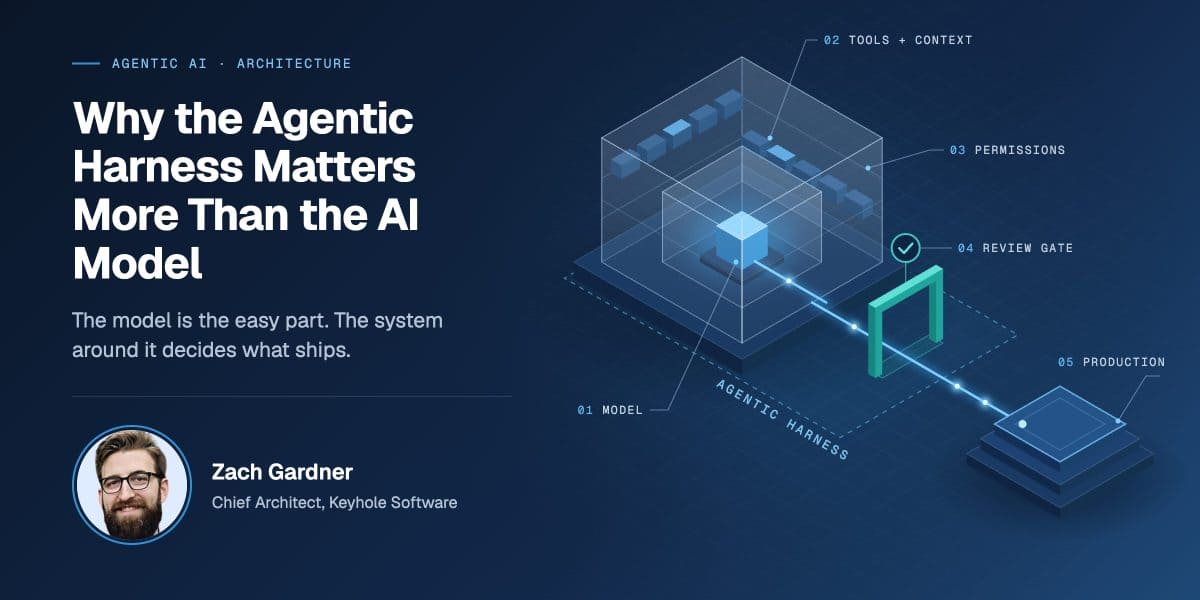
Before an AI agent can modify migration code or data, I want six controls in place. Use the same list when you evaluate a vendor, since the controls should apply no matter who builds the agent. I go deeper on why these controls matter more than the model itself in The Model Is the Easy Part.
- Agents start read-only. Write access is granted per tool and per environment.
- Every change goes through a pull request and normal CI review.
- Tests, data-quality rules, schema checks and query-cost dry runs run before anything merges.
- A model gateway enforces budgets, routes each step to the cheapest capable model, and caps loops.
- Each agent has its own identity, and every model and tool call is traced so changes can be explained or rolled back.
- Regulated data follows hard rules. For example, protected health information goes only to model endpoints covered by a business associate agreement, and anything sent outside the organization needs human approval.
These controls have costs. Faros AI analyzed telemetry from more than 10,000 developers and found that on teams with heavy AI use, developers merged 98% more pull requests while review time rose 91%.
My advice is to budget reviewer capacity up front and to widen what AI is allowed to do in stages, after you’ve measured the results. Without that reviewer capacity, AI work either stalls in review or gets waved through. That gap is part of why Gartner predicts that more than 40% of agentic AI projects will be canceled by the end of 2027 due to escalating costs, unclear business value, or inadequate risk controls.
Where to Start: High-Value, Low-Effort Risk Levers
If you’re deciding where to spend first, the chart places eleven levers by effort and by risk removed. The placements are my judgment, based on the sources in this guide.
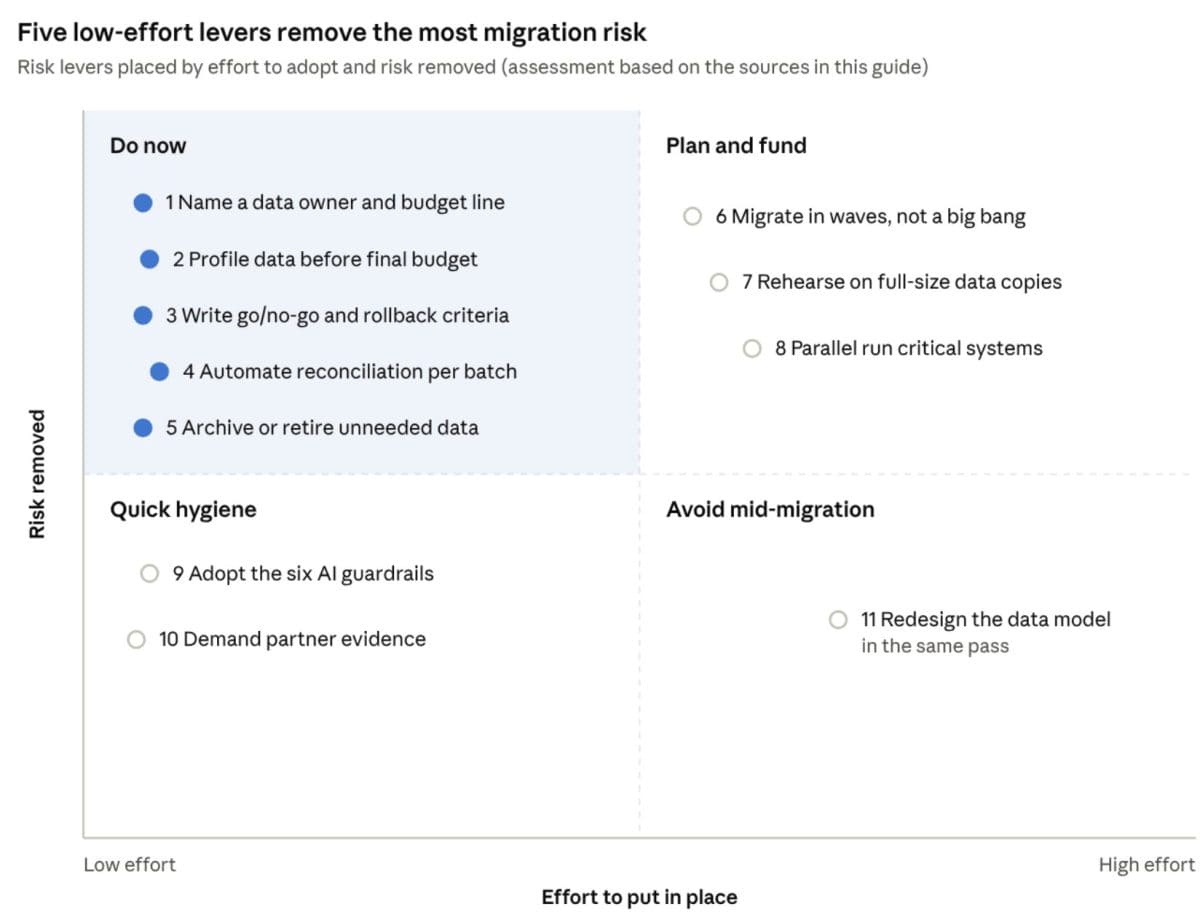
The top-left quadrant is mostly decisions: a named owner and budget line, profiling before the budget is final, written go/no-go and rollback criteria, automated reconciliation, and archiving what you don’t need. None of them requires new tooling, so I’d do them first. Adopting the AI guardrails and asking partners for evidence are cheap too, though they remove less risk on their own.
Waves, full-size rehearsals, and parallel runs cost real time and infrastructure. I’d pay for them on mission-critical systems and be more selective elsewhere, for the reasons in When Waves Are Worth the Cost.
The one I’d steer you away from is redesigning the data model in the same pass. Our strategy guide warns that over-scoped replatforming can drift into rearchitecture without the planning rearchitecture needs. I’d move the data first and change the model in a later project.
Data Migration Checklist: Evidence to Ask for at Each Gate
At each gate, ask for evidence you can look at. If the team can’t produce it, treat that as a red flag.
Download the Data Migration Executive Checklist (PDF)Before Funding
- A one-sentence statement of the business reason for the migration
- The budget line for data migration and the name of the person who owns it
- The profiling report, and the estimate that changed because of it
- The list of data you’re choosing not to migrate, and who approved it
Before Build
- The mapping spec, with business-owner sign-off on each transformation rule
- The reconciliation specification, including pass/fail thresholds
- Where each applicable compliance requirement shows up in the design
- Where AI will be used, what it can touch, and which of the guardrails above are in place
Before Each Wave
- Timing from the last rehearsal, showing it finished inside the cutover window with no manual steps
- The previous wave’s reconciliation report, with every difference explained
Before Cutover
- The written go/no-go criteria and the name of the person making the call
- Results from the rollback rehearsal, including how long it took
- For critical systems, the parallel-run plan: how long it lasts and what counts as a match
Before Decommissioning Legacy
- Parallel-run results covering a full business cycle, such as a month-end close
- Proof that archived data is stored per your retention policy and can be retrieved
When Evaluating a Partner (Us Included)
- Records migrated, reconciliation error rates, and cutover downtime from past projects
- References from a data migration of similar size and regulation
- How many of their engineers have shipped a governed AI agent into production (I’d ask us this, too)
Before You Approve the Budget
Most of what goes wrong in a data migration is visible early, if someone is paid to look. Profile the data before you set the budget, give the migration its own owner, and make every gate produce evidence you can read. Do that, and AI becomes a way to move faster through work that’s already under control, not a faster way to make mistakes nobody catches.
Data Migration FAQs
Why do data migrations fail?
Most failures trace back to data nobody profiled, business rules that only lived in old code, and cutovers with no rehearsed way back. Treating the migration as a sub-task of the application project, with no owner or budget line, makes all three worse.
Should we migrate in waves or in a single cutover?
Waves let you find mistakes while the scope is still small, but they extend the time both systems are live. A single cutover with a rehearsed rollback can make sense for a small, well-understood dataset when the business can tolerate a short outage.
Can AI be used safely in a data migration?
Yes, with the same quality gates you’d apply to human work. AI is most useful for reading legacy code, drafting mappings, and generating reconciliation tests, while people own business rules, sign-offs, and pass/fail thresholds.
What should reconciliation check besides row counts?
Totals on the fields the business cares about, such as premiums or balances. Row counts can match exactly while the values inside the rows are wrong.
Further Reading From Keyhole
| Publication | Date | What it covers |
|---|---|---|
| The Model Is the Easy Part: Why the Agentic Harness Decides What Ships (my post) | Oct 13, 2026 | The controls I require around AI agents, why data engineering is the first place I would use them, and a preview of our upcoming white paper on agentic harness architecture |
| The Software Modernization Process: 7 Phases, Pitfalls, and Best Practices | May 11, 2026 | Why data migration is the most underestimated workstream, how we run AI-assisted work, and the cutover practices we treat as non-negotiable |
| How to Build a Software Modernization Strategy (2026) | Apr 28, 2026 | Covers early profiling, documented rules, reconciliation after every batch, and rollback for every step |
| AI-Accelerated COBOL Modernization to Spring Batch (case study) | Updated Feb 2026 | A 20% to 30% cut in manual effort using a private AI tool, with the approach reused as a template |
| COBOL Modernization Strategy with Spring Batch (white paper) | Feb 2024 | Makes the case for rewriting mainframe batch data processing as Spring Batch jobs |
Sources
- Keyhole Software, The Model Is the Easy Part: Why the Agentic Harness Decides What Ships, Zach Gardner, Oct 13, 2026
- Keyhole Software, The Software Modernization Process: 7 Phases, Pitfalls, and Best Practices, May 11, 2026
- Keyhole Software, How to Build a Software Modernization Strategy (2026), Apr 28, 2026
- Keyhole Software, AI-Accelerated COBOL Modernization to Spring Batch, case study, updated Feb 2026
- Keyhole Software, COBOL Modernization Strategy with Spring Batch, white paper, 2024
- Keyhole Software, Modernization Lessons: FTP & the Mainframe, Clayton Neff, September 19, 2017
- Data Migration Pro, Data Migration Research Study 2017, commissioned by Experian, survey of 270 practitioners, April 2017
- Bloor Research, Data Migration, white paper by Philip Howard, undated
- AWS News Blog, AWS Database Migration Service now automates time-intensive schema conversion tasks using generative AI, Sébastien Stormacq, December 1, 2024
- Keyhole Software, St. Louis Healthcare Data Platform Modernization & Streaming Integration, case study
- Faros AI, The AI Productivity Paradox Report 2025, July 23, 2025
- Gartner, Gartner Predicts Over 40% of Agentic AI Projects Will Be Canceled by End of 2027, June 25, 2025
- Keyhole Software, AI-Accelerated Development in Practice: A Repeat Client Modernization Story, case study
More From Zach Gardner
About Keyhole Software
Expert team of software developer consultants solving complex software challenges for U.S. clients.
Share This Post
Join The Thousands Of Devs Who Subscribe
Discuss This Article
Subscribe
Login
0 Comments
Oldest