
Legacy System Modernization Approaches: A CTO’s Guide to Rehost, Refactor, or Rebuild
Legacy system modernization is a strategic priority for many organizations, but it is rarely a simple decision. The right path depends on the condition of the system, the business outcome you are trying to achieve, and how much change the organization can realistically absorb.
Large‑scale modernization programs often fail not because of missing technology, but because teams choose the wrong approach for the business context. Today, that constraint is shifting: AI is changing how fast and safely organizations can execute modernization. Used well, AI can accelerate analysis, code transformation, test generation, and documentation; however, used poorly, it can add noise, defects, false confidence, and end up putting enterprises even farther behind.
For technology leaders, choosing a path (from a simple cloud migration to a complete application rebuild) requires a clear-eyed assessment of cost, risk, and long-term business value. A low-risk “lift-and-shift” might be fast, but it can carry forward technical debt, as applications not architected for the cloud rarely if ever work even remotely well or securely in a cloud native environment. A rebuild offers a clean slate, but it demands significant investment and carries its own execution risk.
What This Guide Covers
This guide breaks down the six core legacy modernization approaches, shows where each one fits best, and explains how AI‑accelerated execution changes the economics and risk profile of each. You’ll learn:
- The six core legacy modernization approaches, including where they fit best and how AI is currently accelerating outcomes.
- How to evaluate the tradeoffs between cost, risk, and speed for each approach.
- A decision framework for selecting the right strategy based on your specific system and business goals.
- How these patterns apply in real-world client projects.
AI‑accelerated execution is no longer a side topic in modernization; it is changing how fast and how safely teams can apply each of these six approaches. This guide explains how AI changes the economics and risk profile of each strategy, not just the technical stack, so that technology leaders can make decisions that are both modern and measurable.
Understanding the 6 Rs of Legacy Modernization
Modernization is not a single decision. It is a set of options, each with different tradeoffs in speed, risk, cost, and long-term value. The right approach depends on the condition of the existing system, the business outcome you are trying to achieve, and how much change the organization can absorb.
Successful modernization begins with a clear understanding of the available strategies.
The 6 Rs as a Hybrid Framework
The “6 Rs” framework in this guide is a hybrid model that combines Gartner’s original rationalization approach² with the AWS/Microsoft modernization terms most teams use in practice. 3 5 Each approach carries a different profile of cost, risk, and potential reward.
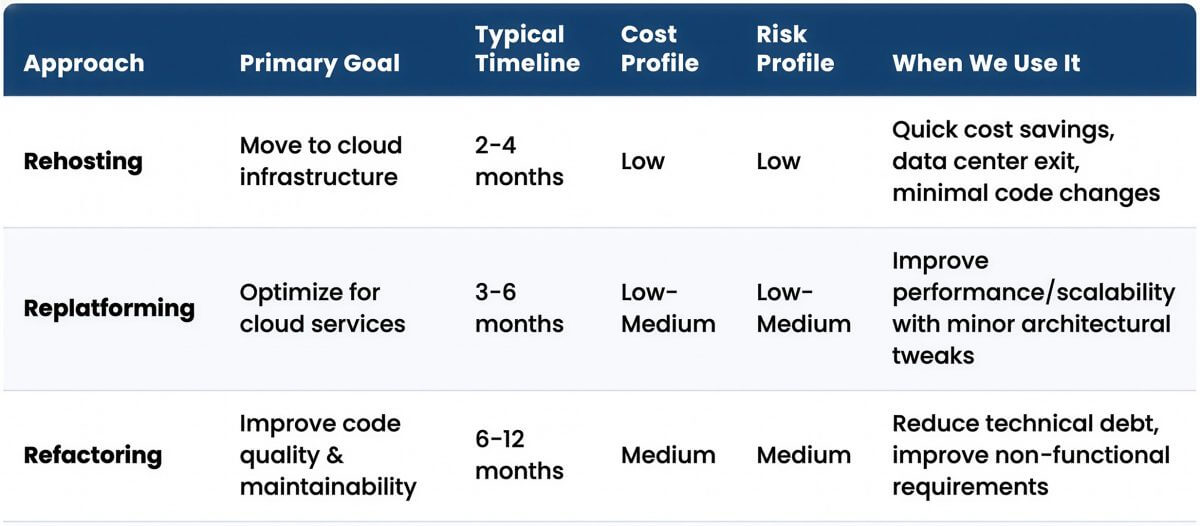
| Approach | Primary Goal | Typical Timeline | Cost Profile | Risk Profile | When We Use It |
|---|---|---|---|---|---|
| Rehosting | Move to cloud infrastructure | 2-4 months | Low | Low | Quick cost savings, data center exit, minimal code changes |
| Replatforming | Optimize for cloud services | 3-6 months | Low-Medium | Low-Medium | Improve performance/scalability with minor architectural tweaks |
| Refactoring | Improve code quality & maintainability | 6-12 months | Medium | Medium | Reduce technical debt, improve non-functional requirements |
| Rearchitecting | Shift to a modern architecture (e.g., microservices) | 9-18 months | High | High | Enable business agility, scale individual components, break up monoliths |
| Rebuilding | Rewrite from the ground up | 12-24+ months | Very High | High | When existing code is unsalvageable or business logic is completely new |
| Replacing | Adopt a SaaS solution | 3-9 months | Medium | Low | For commodity business functions (CRM, HR, etc.) where differentiation is not key |
Note: Different vendors define the Rs slightly differently; this guide uses a practical hybrid framework to keep the decision-making consistent across cloud and modernization scenarios.
In addition to the standard 6 R’s, many enterprise modernization efforts require encapsulation strategies—wrapping legacy systems with APIs to enable incremental transformation without full system replacement.
For many organizations, the best path is not the most ambitious one, it is the one that creates the right balance of business value and execution risk. AI is beginning to improve the speed of analysis, transformation, and validation across all six approaches, but it does not change the underlying decision-making discipline.
For example, Keyhole recently compressed an estimated 18–24 month insurance platform modernization into ~5 months by applying AI‑accelerated replatforming (AWS RDS + containerization) within a governed delivery model. This shows how AI changes the economics of each R without changing the decision criteria [Read Case Study].
The goal is not just to modernize an older system, but to modernize it faster and with better visibility, using AI as a controlled execution layer inside a governed delivery model.
Rehosting Legacy Systems (Lift-and-Shift)
Rehosting, often called “lift and shift,” is the process of moving an application from an on-premises data center to cloud infrastructure with minimal changes to the underlying code.³ It’s typically the fastest and initially least expensive path to the cloud, which makes it a strong choice when the immediate goal is to exit a data center, reduce infrastructure overhead, or move quickly while preserving the existing application logic.
| Aspect | Description | Key Considerations | Real-World Example |
|---|---|---|---|
| Process | Re-deploying applications to virtual machines or containers in the cloud. | Requires detailed dependency mapping and infrastructure-as-code (IaC) for repeatability. | Migrating a Java application from a local server to an AWS EC2 instance. |
| Tooling | AWS Application Migration Service, Azure Migrate, Terraform, Ansible. | IaC tools like Terraform are critical for managing the new cloud environment. | Using Terraform to define and provision the VPC, subnets, and security groups. |
| Outcomes | Reduced infrastructure costs, increased operational resilience. | Does not address technical debt or improve application architecture. | The application still runs on a Windows Server OS, but now it’s in the cloud. |
| Risks | “Cloud-washing” legacy problems; performance may not improve without tuning. | A poorly performing on-premise application will likely be a poorly performing cloud application. | An application with a chatty database connection becomes more expensive in the cloud due to egress fees. |
For organizations under pressure to modernize quickly, rehosting can create immediate perceived business value. It reduces the risk of a full redesign, shortens migration timelines, and gives teams a cloud environment to work from while they plan future optimization. AWS and Microsoft both describe rehosting as a practical approach when speed matters and the organization wants to preserve application behavior while changing the hosting environment.
In practice, rehosting is often a pragmatic first step rather than a final destination. It can reduce migration risk, shorten timelines, and give teams a cloud environment to work from while they plan deeper optimization. The tradeoff is that rehosting usually moves technical debt into the cloud rather than eliminating it, so performance issues, brittle dependencies, and operational inefficiencies may still remain after the migration. Fundamentally, applications that were not intended to run in a distributed, latency aware environment will likely not run remotely well at scale in the cloud.
Healthcare Example: Keyhole modernized a St. Louis healthcare client’s legacy databases to AWS (S3 → Spark → Kinesis → Lambda), creating FHIR‑compliant streaming with a reusable CSV mapping library. This preserved business logic while enabling cloud‑native scalability and HIPAA compliance.
When Rehosting Makes Sense
- You need to leave an on-premises data center on a compressed timeline.
- The application is stable, but the infrastructure is becoming expensive or hard to support.
- The business wants a lower-risk first step before investing in deeper modernization.
- You want to create a cloud landing zone for future refactoring, replatforming, or rebuilding.
What To Watch For
Rehosting works best when teams understand the application’s dependencies, hosting requirements, and cutover risks. If those dependencies are not mapped well, teams can discover performance issues, integration failures, or environment mismatches after the move.
It is also important to resist the temptation to treat rehosting as the finish line; a successful lift-and-shift migration should usually be part of a larger modernization roadmap, not the final destination. Security is also a large consideration for rehosting, as there are several assumptions that were likely made in the initial design of the application which were true in an on-premise environment but are simply the wrong choice in a cloud environment. At the very least, a penetration test is necessary, ideally follow closely by an analysis of how closely an application follows architectures like Zero Trust.
How AI Accelerates Rehosting
AI improves rehosting by accelerating the planning and discovery phase, which is often where delays occur. Teams can use it to:
- Map dependencies across systems and services,
- Identify infrastructure requirements,
- Generate infrastructure‑as‑code templates, and
- Validate environment configurations before deployment.
That reduces manual effort and helps prevent missed connections during migration. AI does not change the core nature of the strategy—the application is still being moved, not redesigned—but it does change how quickly and reliably that move can happen.
Replatforming Legacy Systems (Lift-and-Reshape)
Replatforming, sometimes called “lift and reshape,” involves making targeted cloud optimizations during the migration process without changing the core application architecture.⁴ It sits between rehosting and refactoring: the application is still fundamentally the same, but select components are adjusted to take better advantage of cloud services.
| Aspect | Description | Key Considerations | Real-World Example |
|---|---|---|---|
| Process | Modifying components to take advantage of cloud-native services. | Identify components that are expensive or difficult to manage on-premises. | Swapping a self-hosted message queue for AWS SQS or Azure Service Bus. |
| Tooling | Docker, Kubernetes, AWS RDS, Azure SQL Database. | Managed services reduce operational burden but can introduce vendor lock-in. | Moving from a self-managed MySQL database to Azure Database for MySQL. |
| Outcomes | Improved performance, reduced operational overhead, better scalability. | A good balance between cost, effort, and benefit. | The application now auto-scales based on traffic, and database patching is automated. |
| Risks | Can introduce new dependencies; requires cloud-specific skills. | The team needs to understand how to monitor and debug managed services. | A misconfigured managed service can be more expensive than the on-premise equivalent. |
This approach is a strong fit when an organization wants more than a simple move to the cloud but is not ready for a deeper redesign. It could mean moving from a self-managed database to a managed service like Amazon RDS, or containerizing an application to run on Kubernetes. The goal is to improve operational efficiency, scalability, or performance without taking on the cost and risk of a larger rewrite.
Replatforming is often the best choice when the business wants measurable improvement without a major architectural reset. It can reduce maintenance overhead, simplify operations, and create a better foundation for future modernization while still preserving most of the existing business logic.
When Replatforming Makes Sense
- The application works well enough, but the supporting infrastructure is too expensive or hard to manage.
- You want cloud benefits such as managed services, better scalability, or automated operations without a full redesign.
- The team is ready for targeted technical improvements, but not a long architectural program.
- You want to modernize incrementally while preserving the core application.
Cloud Provider Example: Keyhole helped a managed hosting provider replatform internal services to AWS Lambda + Step Functions (serverless), using Node.js/Python while preserving multi‑cloud integration. Serverless Framework accelerated deployment and scalability.
What To Watch For
Replatforming can introduce new dependencies, especially when managed cloud services are involved. That means teams need the right operational skills for monitoring, troubleshooting, and cost control, or they may trade one kind of complexity for another.
It is also possible to overdo replatforming. If every component is replaced or heavily modified, the effort can start to resemble a refactoring or rearchitecture initiative without the same level of strategic planning.
How AI Accelerates Replatforming
AI can improve replatforming by helping teams:
- Evaluate bottlenecks and workload patterns,
- Identify inefficient infrastructure usage, and
- Recommend cloud services that better fit the workload.
It can also assist with configuration changes, workload analysis, and migration planning, which helps teams make better optimization decisions faster. Used this way, AI does not replace the migration strategy. It simply helps teams choose and execute the right cloud improvements with more speed and less manual effort.
Refactoring Legacy Systems
Refactoring is the process of restructuring existing code without changing its external behavior.⁵ The goal is to improve non-functional attributes of the software, such as readability, maintainability, testability, and performance.
| Aspect | Description | Key Considerations | Real-World Example |
|---|---|---|---|
| Process | Applying a series of small, behavior-preserving transformations. | Requires a strong suite of automated tests to ensure no regressions are introduced. | Extracting a complex calculation into its own service and replacing the original code with a call to that service. |
| Tooling | SonarQube, IDE refactoring tools (IntelliJ, VS Code), automated testing frameworks (JUnit, NUnit). | Static analysis tools can identify code smells and areas for improvement. | Using SonarQube to identify duplicated code blocks that can be consolidated. |
| Outcomes | Reduced technical debt, improved code quality, easier to add new features. | A necessary step before attempting larger architectural changes. | Developers can now add new features in days instead of weeks. |
| Risks | Can be time-consuming; may not deliver immediate business value. | Business stakeholders need to understand that refactoring is an investment in future velocity. | Spending three months refactoring a module without shipping any new features. |
This approach is especially valuable when organizations want to reduce technical debt and make future change easier. Rather than replacing the system or moving it to a new platform unchanged, refactoring improves the code itself so the application becomes easier to understand, test, and extend over time.
Refactoring is often a necessary step before larger modernization work can succeed. If a system is too brittle, too poorly documented, or too tightly coupled, small structural improvements can reduce risk and make later decisions, such as rearchitecting or rebuilding, more practical.
Traditionally, this has been a time-intensive and manual process. AI changes that dynamic.
For example, in a recent COBOL to Spring Batch modernization, our AI workflows automated rote code conversion, cutting effort 20–30% while preserving business logic. Senior consultants focused on architecture instead of boilerplate, proving AI accelerates refactoring without changing external behavior. [Link to case study]
When Refactoring Makes Sense
- The application still solves the right business problem, but the codebase is hard to maintain.
- You need to reduce technical debt without changing the system’s outward behavior.
- The team wants to improve test coverage, readability, and developer productivity.
- The organization is planning a larger modernization effort and needs to stabilize the foundation first.
What To Watch For
Refactoring can be time-consuming, and it does not always produce obvious short-term business gains. If the effort is not tied to a clear outcome, stakeholders may see it as “work on the codebase” rather than a modernization investment.
It also requires discipline. Without good automated tests and clear quality gates, refactoring can accidentally introduce regressions instead of reducing risk.
How AI Accelerates Refactoring
AI can make refactoring more efficient by:
- Identifying redundant or outdated code,
- Suggesting restructuring opportunities,
- Generating unit and integration tests, and
- Summarizing complex or undocumented business logic.
That can shorten the time needed to understand a legacy system and reduce the manual effort involved in making safe, incremental improvements.
Used well, AI is especially helpful in older codebases where institutional knowledge is limited and the documentation no longer matches reality. It helps teams move faster, but the actual refactoring decisions still need engineering judgment and validation.
Rearchitecting Legacy Applications
Rearchitecting involves fundamentally changing the application’s architecture to take advantage of modern patterns, most commonly moving from a monolith to a microservices-based architecture.⁶ This is a significant undertaking, driven by the need for greater business agility and scalability.
| Aspect | Description | Key Considerations | Real-World Example |
|---|---|---|---|
| Process | Decomposing a monolithic application into smaller, independent services. | Requires a deep understanding of domain-driven design to identify service boundaries correctly. | Creating a separate “Payments” microservice that handles all credit card processing. |
| Tooling | Docker, Kubernetes, API Gateways (Apigee, Kong), Service Mesh (Istio, Linkerd). | A service mesh can help manage the complexity of inter-service communication. | Using Istio to handle traffic routing, retries, and circuit breaking between services. |
| Outcomes | Increased deployment frequency, improved scalability and resilience, teams can work independently. | The primary driver for most large-scale digital transformations. | The checkout team can deploy updates without impacting the product catalog team. |
| Risks | High complexity, requires mature DevOps practices, risk of creating a distributed monolith. | Without proper governance, you can end up with a system that is more complex and less reliable than the original monolith. | Two microservices that are tightly coupled and must be deployed together. |
This approach can unlock much greater agility, but it also introduces more complexity. Microservices are typically built around business capabilities and independently deployable, which means teams can move faster once the new architecture is in place — but only if they have strong design discipline, automation, and operational maturity.
When Rearchitecting Makes Sense
- The monolith is slowing down delivery and preventing teams from working independently.
- The business needs higher scalability, faster release cycles, or more resilience.
- The system has clear domain boundaries that can be separated into services.
- The organization has the engineering maturity to support distributed systems.
What To Watch For
Rearchitecting is one of the highest-risk modernization paths because it can create a distributed monolith if service boundaries are wrong or if the team decomposes the system too quickly. It also requires mature DevOps practices, strong observability, and careful attention to data ownership and inter-service communication.
For that reason, many teams use incremental patterns such as the strangler fig approach rather than attempting a full rewrite all at once. AWS specifically recommends incremental modernization patterns and tooling to reduce risk during microservices transitions.
How AI Accelerates Rearchitecting
AI can support rearchitecting by helping teams:
- Analyze dependencies across modules,
- Identify likely service boundaries, and
- Generate early API contracts and service scaffolding.
It can also speed up documentation and help teams reason about complex legacy flows before major design decisions are made.
That said, AI is only a starting point here. Rearchitecting still depends on human architectural judgment, because the quality of the boundary decisions has a major impact on long-term maintainability and delivery speed.
Rebuilding Applications
Rebuilding involves starting from scratch, rewriting an application with a modern technology stack and architecture. This approach is taken when the existing system is so outdated or convoluted that it’s no longer worth salvaging.
This was the case for Kansas City Southern Railroad.⁷ Their core operational system was a 30-year-old VB and COBOL-based application that was impossible to maintain and adapt. We worked with them to rebuild the entire system as a modern .NET microservices application. The project was a multi-year effort, but the result was a system that provided real-time visibility into their operations and enabled a new generation of business capabilities.
| Aspect | Description | Key Considerations | Real-World Example |
|---|---|---|---|
| Process | A greenfield development project to replace a legacy system. | An opportunity to rethink business processes, not just replicate them. | Designing a new workflow that automates manual steps from the old system. |
| Tooling | Modern frameworks (React, Angular, Spring Boot, .NET), cloud-native services. | The choice of technology stack will impact the application for the next 10-15 years. | Building a new application using React for the front end and .NET for the back end. |
| Outcomes | A modern, scalable, and maintainable application that is aligned with current business needs. | The highest potential for business transformation. | The new system allows the business to enter new markets that were previously impossible. |
| Risks | Highest cost and timeline; risk of a “big bang” failure; business requirements may change during the project. | A phased rollout is critical to mitigate risk and deliver value incrementally. | A two-year project that is canceled after 18 months because it has not delivered any value. |
Because rebuilds take significant time and investment, they should be reserved for cases where the current system cannot realistically be improved enough through smaller changes. In many cases, the value of rebuilding comes not just from replacing old code, but from rethinking the business process itself.
When Rebuilding Makes Sense
- The existing system is too outdated, brittle, or expensive to maintain.
- The application still matters to the business, but the current design is holding back growth.
- The organization wants to introduce a modern architecture, cloud-native services, or a better user experience.
- The team is willing to invest in a long-term transformation rather than a quick fix.
What To Watch For
Rebuilding carries the biggest risk of delay, scope creep, and big bang failure. If the team tries to recreate every old process exactly as it exists today, it can end up spending a lot of time rebuilding technical debt instead of improving the business outcome.
That is why rebuild programs work best when they are phased, tightly governed, and tied to clear business priorities. A rebuild should create room for better design decisions, not just a new version of the same system.
How AI Accelerates Rebuilding
AI can accelerate rebuilding by:
- Generating application scaffolding and boilerplate code,
- Assisting with feature development and UI/API creation, and
- Automating repetitive coding tasks such as mapping DTOs, controllers, and database layers.
AI is especially helpful in rebuilding because it removes some of the boilerplate cost that has historically made full rewrites so expensive. That helps senior engineers spend more time on architecture, business logic, and decisions that matter most. Even so, the team still has to make the hard product and architecture decisions; AI can speed execution, but it cannot define the right business model for the new system.
Replacing Systems
Replacing involves decommissioning a legacy application and switching to a commercial off-the-shelf (COTS) or Software-as-a-Service (SaaS) solution.⁸ This is the best choice for commodity business functions where the organization does not need a custom solution to gain a competitive advantage.
This approach can deliver value quickly because the business is adopting a mature platform instead of funding a new build. In many cases, the real work is not development but selection, configuration, data migration, integration, and change management.
| Aspect | Description | Key Considerations | Real-World Example |
|---|---|---|---|
| Process | Migrating data and processes to a SaaS platform. | Requires a thorough evaluation of SaaS vendors to ensure they meet business and security requirements. | Moving from a custom-built HR system to Workday. |
| Tooling | SaaS platforms (Salesforce, Workday, ServiceNow), data migration tools (Informatica, Talend). | The focus is on configuration and integration, not coding. | Configuring custom fields and workflows in Salesforce to match the business process. |
| Outcomes | Reduced maintenance overhead, access to new features, predictable costs. | Frees up development teams to work on systems that provide a competitive advantage. | The IT team no longer has to worry about patching or upgrading the CRM system. |
| Risks | Vendor lock-in, data migration complexity, loss of custom features. | The SaaS vendor’s roadmap may not align with your business priorities. | A custom feature that was critical to the business is not available in the new SaaS product. |
Replacing is often the most practical option when the current system creates more maintenance cost than business value. If the business process can be standardized without losing something unique, moving to SaaS can free the internal team to focus on higher-value systems.
When Replacing Makes Sense
- The application supports a commodity function such as HR, CRM, ticketing, or finance operations.
- The organization does not need unique custom behavior to stay competitive.
- The current system is expensive to maintain or hard to secure.
- A mature SaaS product already covers most of the required capability.
What To Watch For
Replacing can create vendor lock-in, especially if the new platform becomes deeply embedded in business operations. Teams also need to pay close attention to data migration, security requirements, and the fit between the SaaS product’s workflows and the organization’s actual processes.
Another common mistake is assuming SaaS is automatically simpler. Even when the code burden goes away, the organization still has to manage configuration, integrations, identity, reporting, and user adoption.
How AI Accelerates Replacement
AI can make replacing legacy systems faster and more predictable by:
- Mapping legacy workflows to the target SaaS platform,
- Assisting with data transformation and migration, and
- Identifying gaps between current and target capabilities, such as custom fields, approval patterns, or reporting logic.
That can shorten analysis time, reduce manual configuration effort, and make the migration process more predictable. Used well, AI helps teams move faster through evaluation and migration planning, especially when they are trading a custom‑built application for a complex SaaS tenant. It does not replace the need to test the new platform carefully or confirm that the SaaS product actually supports the business process the organization needs, but it can dramatically reduce the friction of getting from “old system” to “live replacement.”
Keyhole sees this as a major growth area in the years to come. With the barrier to entry lowered so drastically, replacing SaaS platforms with the limited amount of features that organizations often used, allowing them to tailor the software to their business rather than the other way around, will lead to massive competitive advantages simply not feasible prior to the proliferation of AI assisted coding.
How AI Changes Legacy Modernization
AI is most effective when it is applied across the full modernization lifecycle, not just as a coding tool at the end. Used well, it can accelerate analysis, code transformation, test generation, and documentation, reducing the manual effort needed to understand and modernize legacy systems.
AI Impact by Modernization Approach
| Approach | AI Impact |
|---|---|
| Rehost | Faster system discovery, dependency mapping, and migration planning |
| Replatform | Workload analysis and smarter cloud service selection |
| Refactor | Code understanding, restructuring suggestions, and automated test generation |
| Rearchitect | Dependency analysis and identification of service boundaries |
| Rebuild | Accelerated scaffolding, code generation, and feature development |
| Replace | Workflow mapping, data transformation, and SaaS gap analysis |
That speed comes with a tradeoff. AI introduces new risks if outputs are not governed, validated, or traceable. That is especially true for data migration, security, compliance, and cutover planning, where AI can help teams move faster but should not replace disciplined decision‑making.
Governed AI‑accelerated modernization is not about replacing strategy, architecture, or governance. It is about supporting them with faster execution, better visibility, and more consistent delivery. For organizations evaluating modernization options today, the question is not whether to use AI, but how to apply it in a way that reduces risk and improves business outcomes.
Critical Considerations for Any Approach
Beyond choosing one of the six approaches, several cross-cutting concerns are critical to the success of any modernization project.
Data Migration and Governance
Legacy data is often the most valuable and most challenging part of a modernization effort. Data is frequently trapped in outdated formats, with years of inconsistent business rules encoded in its structure. A successful migration requires a dedicated effort to extract, cleanse, validate, and transform data before it can be moved to a new system. In our experience, underestimating data migration is one of the most common reasons modernization projects go over budget and timeline.
Security, Compliance, and Risk Management
Modernization is an opportunity to improve security posture, not just carry it forward. Each approach has different security implications:
- A rehost might inherit the same vulnerabilities of the legacy system
- A rebuild offers a chance to design security in from the start.
For regulated industries (healthcare, finance), compliance with standards like HIPAA, PCI-DSS, and SOC 2 must be a primary consideration in the architecture.
Testing and Cutover Strategies
How you transition from the old system to the new one is as important as the new system itself. Strategies like the Strangler Fig Pattern⁹, where you incrementally replace pieces of the old system with new services, can de-risk the cutover. Parallel runs, where the old and new systems operate simultaneously for a period, provide a safety net but come at a high operational cost. The right strategy depends on the organization’s tolerance for risk and the criticality of the system.
The Keyhole Decision Framework
Choosing the right modernization path is less about finding the “best” technical option and more about matching the approach to the business problem through a structured decision-making process. The same system can be a good candidate for rehosting in one scenario, refactoring in another, or rebuilding if the business need is large enough.
A strong decision process starts with the business outcome, not the technology preference. If the main goal is speed and stability, a lower-change path may be the right answer. If the goal is long-term agility or a major product reset, a deeper transformation may be justified. We use a five-step framework to help clients make a choice that aligns with their business goals, technical reality, and organizational capacity.
1. Assess the Business Context
What is the primary driver for modernization? Is it cost savings, business agility, risk reduction, or something else? The business driver should be the primary lens through which all other decisions are viewed.
2. Evaluate the Existing System
How bad is it, really? A thorough assessment of the existing application’s architecture, code quality, and technical debt is critical. A structurally sound application might be a good candidate for refactoring, while a brittle, tightly-coupled monolith may need to be rebuilt or replaced.
3. Analyze the Cost and ROI
Each approach has a different cost profile and potential return on investment. A detailed financial analysis should consider not just the upfront project cost, but also the long-term total cost of ownership (TCO), including licensing, infrastructure, and maintenance.
4. Consider the Human Element
Does your team have the skills and appetite for a large-scale rebuild, or would a more incremental approach be a better cultural fit? Change management, training, and upskilling are critical components of any successful modernization effort.
5. Define a Phased Roadmap
Regardless of the chosen approach, a phased roadmap that delivers incremental value is almost always better than a “big bang” transformation. A good roadmap identifies quick wins that can build momentum and fund later, more complex phases of the project.
A simple rule of thumb:
- Rehost when the priority is speed and minimal change.
- Replatform when you want cloud efficiency without redesign.
- Refactor when the code works but needs structural improvement.
- Rearchitect when the business needs a new operating model or much greater agility.
- Rebuild when the current system is too limiting to salvage.
- Replace when the capability is better bought than built.
AI can improve each step of this process by speeding analysis, summarizing legacy systems, surfacing dependencies, and helping teams compare options more quickly. But the decision itself still needs human judgment, because modernization is ultimately a business choice, not just a technical one.
Keyhole’s AI-Accelerated Delivery Model
Modern AI tools are beginning to change the economics of modernization.¹¹ At Keyhole, we use AI inside a governed delivery process, not as a replacement for engineering judgment. The goal is to accelerate analysis and execution while preserving validation, traceability, and architectural consistency.
In practice, that means AI supports every phase of modernization:
- Legacy system analysis and dependency mapping,
- Code transformation and test generation,
- Incremental refactors and reworks,
- And client‑ready documentation and knowledge transfer.
That approach helps teams move faster without losing architectural consistency or control. In modernization work, speed only matters if the outputs are reliable, reviewable, and aligned to the target architecture.
At Keyhole, we treat AI as a disciplined accelerator inside a structured delivery process, not as a magic button. The goal is to speed up execution without sacrificing control, traceability, or architectural consistency. In that sense, AI does not change what modernization is; it changes how fast you can do it, with less manual overhead.
How AI Fits Into Our Delivery Loop
AI supports every phase of the modernization lifecycle:
- Analysis: mapping legacy systems, business logic, and dependencies.
- Transformation: converting code, re‑expressing workflows, and generating tests.
- Documentation: summarizing undocumented logic and creating reference assets.
- Delivery: automating scaffolding, form‑style code, and repetitive patterns.
Our delivery model follows a tightly governed loop:
- Define the intent and backlog,
- Apply AI‑assisted transformation,
- Validate outputs with human review and testing,
- Commit and keep traceability,
- Then repeat for the next scope.
AI does not replace the role of the architect, SME, or testing gate; it reduces the time they spend on routine, repeatable work.
Why Governance Matters More Than Speed
As AI accelerates execution, governance moves upstream. Speed only matters if the outputs are reliable, reviewable, and aligned to the target architecture. Without that, automation can multiply the risk of inconsistent patterns, hidden defects, and unverified outputs.
At Keyhole, governance means:
- Every AI‑generated change is validated,
- Quality gates are enforced, and
- Architectural decisions remain human‑driven, even when AI helps execute them.
That turns AI from a potential risk into a controlled force multiplier inside a modernization program.
Final Perspective
Legacy system modernization is a complex undertaking, but it is also a critical one for long-term business survival and growth. There is no single right answer, only a series of informed trade-offs.
The most successful organizations are those that approach modernization not as a one-time project, but as a continuous process of aligning their technology portfolio with their business strategy. By understanding the six core approaches and applying a disciplined decision framework, technology leaders can navigate this complexity and make choices that deliver real, lasting value.
AI is changing how modernization is executed. It accelerates analysis, transformation, and delivery, reducing the manual effort required to understand and evolve legacy systems. But it does not replace architectural judgment, governance, or decision-making discipline.
Organizations that succeed will combine:
- AI-accelerated execution
- Architect-led governance
- A structured modernization strategy
This is what allows teams to move faster without increasing risk.
At Keyhole, our team of senior, U.S.-based consultants helps organizations do just that. We bring a pragmatic, experience-driven approach to modernization, helping our clients choose the right path and execute it with excellence.
The question is no longer whether to modernize, but how to do it effectively using AI. If you’re facing a legacy modernization challenge, Contact Keyhole Software.
References
- McKinsey & Company, “Losing from day one: Why even successful transformations fail,” 2022. https://www.mckinsey.com/capabilities/transformation/our-insights/common-pitfalls-in-transformations-a-conversation-with-jon-garcia
- Gartner, “The 5 Rs of Application Modernization,” 2010.
- AWS, “6 Strategies for Migrating Applications to the Cloud,” 2016. https://aws.amazon.com/blogs/enterprise-strategy/6-strategies-for-migrating-applications-to-the-cloud/
- AWS Prescriptive Guidance, “Migration Strategies.” https://docs.aws.amazon.com/prescriptive-guidance/latest/large-migration-guide/migration-strategies.html
- Microsoft Azure, “The 6 Rs of Application Modernization.” https://learn.microsoft.com/en-us/azure/app-modernization-guidance/plan/the-6-rs-of-application-modernization
- Martin Fowler & James Lewis, “Microservices,” 2014. https://martinfowler.com/articles/microservices.html
- Keyhole Software, “COBOL Modernization and Microservices Implementation for KC Southern.” https://keyholesoftware.com/projects/cobol-modernization-and-microservices-implementation-for-kc-southern/
- Gartner, “Gartner Survey Reveals That Only 48 Percent of Digital Initiatives Meet or Exceed Their Business Outcome Targets,” 2024. https://www.gartner.com/en/newsroom/press-releases/2024-10-22-gartner-survey-reveals-that-only-48-percent-of-digital-initiatives-meet-or-exceed-their-business-outcome-targets
- Martin Fowler, “StranglerFigApplication,” 2004. https://martinfowler.com/bliki/StranglerFigApplication.html
- Keyhole Software, “AI-Accelerated COBOL Modernization to Spring Batch.” https://keyholesoftware.com/projects/ai-accelerated-cobol-modernization-to-spring-batch
- FinOps Foundation, “What is FinOps?” https://www.finops.org/introduction/what-is-finops/
- Microsoft Azure, “Mainframe Rehost Architecture on Azure.” https://learn.microsoft.com/en-us/azure/architecture/example-scenario/mainframe/mainframe-rehost-architecture-azure
- AWS, “The Lift and Shift: Rehosting Servers to AWS During a Cloud Transformation.” https://aws.amazon.com/blogs/enterprise-strategy/the-lift-and-shift-rehosting-servers-to-aws-during-a-cloud-transformation/
- Microsoft Azure, “Strangler Fig Pattern.” https://learn.microsoft.com/en-us/azure/architecture/patterns/strangler-fig
More From Keyhole Software
About Keyhole Software
Expert team of software developer consultants solving complex software challenges for U.S. clients.
Share This Post
Join The Thousands Of Devs Who Subscribe
Discuss This Article
Subscribe
Login
0 Comments
Oldest